
结构化输出
结构化输出,就是希望模型的回复严格按照 JSON 格式输出,以便客户端进行后续解析。
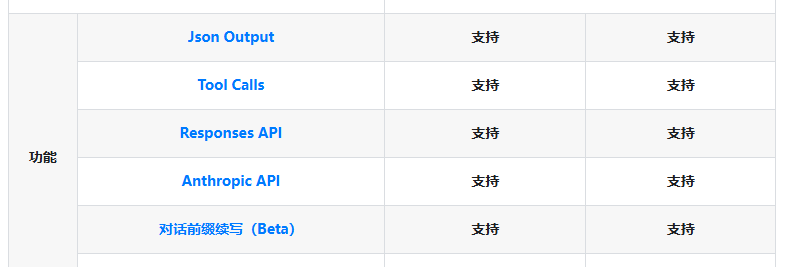
现在很多模型都具有这种能力,例如 deepseek 的 deepseek-v4-flash、deepseek-v4-pro 两个模型的都支持 JSON 格式化。
https://api-docs.deepseek.com/zh-cn/quick_start/pricing/
这种功能是非常实用的,例如我们让 AI 帮我们识别垃圾邮件,需要从一封邮件里抽出发件人、收件人、主题、是否带广告,你希望拿到的是一个有明确字段的对象,而不是回复一段文字。我们编写客户端时可以提供一个 JSON 结构,模型回复就需要符合这种 JSON 结构,这样我们客户端解析起来非常方便。
三种让模型输出 JSON的方式
并不是所有模型服务都支持 JSON 结构化输出的,早期有很多模型并不支持这种功能,所以有些人做了很多兼容模式,以便在模型不支持 JSON 结构化输出的时候,实现兼容解析。
历史上让模型输出 JSON 有三种做法,理解它们的差别,才能明白结构化输出到底强在哪。
| 能力层级 | 保证 | 代表实现 |
|---|---|---|
| JSON Mode | 输出是合法 JSON | OpenAI response_format: {type: "json_object"} |
| JSON Schema | 输出严格匹配指定 Schema | OpenAI response_format: {type: "json_schema"} |
| Function Calling (tool_use) | 参数严格匹配函数签名 | 所有三大厂商 |
| Constrained Decoding | 从 token 生成层面强制约束 | OpenAI Structured Outputs 底层机制 |
① Prompt 提示
最朴素的办法就是在提示词里加一句提示词,
请以 JSON 格式输出,字段包括 name、age、occupation
模型收到提示词后,会尽力配合,但没有任何机制兜底,可能多字段、漏字段、拼错字段名,甚至在 JSON 前后混入一段文字。可靠性全看模型心情和提示词写得有多细,没有任何保证。
② JSON Mode
跟函数调用模式差不多,提供 JSON 格式参数,模型保证吐出来的是一段合法 JSON,大括号配对、引号闭合、能用解析器正常解析。
请求参数:
response_format: { type: "json_object" }
但要注意,JSON Mode 只保证语法,不保证结构,所以它输出的字段名、数量、类型全凭自己发挥。比如你要的是 { "name", "age", "occupation" },模型可能给你 { "姓名": "张三", "职业": "工程师" },语法上是合法 JSON,能正常解析,但字段名对不上、age 字段根本没出现。
③ Structured Outputs
最严格的做法。把一份完整的 JSON Schema 一起发过去,明确告诉它输出必须是一个对象,对象的结构组成。
如下所示:
   "response_format": {
      "type": "json_schema",
      "json_schema": {
        "name": "joke_response",
        "strict": "true",
        "schema": {
          "type": "object",
          "properties": {
            "joke": {
              "type": "string"
            }
          },
        "required": ["joke"]
        }
      }
    }
在此模式下,模型不是生成完再去核对 schema,而是在生成过程中就按 schema 约束每一个 token,这个机制叫受限解码,下一节会详细讲。
简单说就是模型每生成一个 token 前,会先算出"按 schema 接下去合法的 token 有哪些",把不合法的全部屏蔽掉,只在合法集合里采样。
因为是逐 token 约束,所以输出结构、字段名、类型必然匹配 schema,它没有机会生成一个不合法的字段。
但是要注意,目前 OpenAI、Anthropic、Gemini 三家的模型接口能力不一样,Anthropic 并不支持 JSON Schema,需要使用 tool_use 方式生成 JSON。OpenAI 接口最完善,所以我们很多案例解析都是基于 OpenAI 接口来做的。
MAF 的结构化输出
大模型给了 response_format 这个能力,但直接用裸 API 你得自己干一堆事,把 C# 类型转成 JSON Schema、把模型返回的 JSON 字符串反序列化回对象、处理流式输出时把碎片拼回去再反序列化、处理基本类型(int、数组)不能直接当 schema 根的尴尬。
所以 MAF 框架把这些都包好了。
重要:并非所有代理类型都支持原生结构化输出。
ChatClientAgent 在每次调用前会合并 ChatOptions和 AgentRunOptions,。核心逻辑在 CreateConfiguredChatOptions 里:
// 源码位置:src/Microsoft.Agents.AI/ChatClient/ChatClientAgent.cs
// 合并时,代理级的 ResponseFormat 只在运行级没指定时填充
requestChatOptions.ResponseFormat ??= this._agentOptions.ChatOptions.ResponseFormat;

// ...

// 运行级的 ResponseFormat 直接覆盖
if (agentRunOptions?.ResponseFormat is not null)
{
    chatOptions ??= new ChatOptions();
    chatOptions.ResponseFormat = agentRunOptions.ResponseFormat;
}
MAF 提供了两条路径,对应两种不同的诉求:
| 方式 | 入口 | 适用场景 |
|---|---|---|
RunAsync<T> | AIAgent 基类的泛型方法 | 编译时已知输出类型,想要强类型对象直接拿 |
ResponseFormat | AgentRunOptions.ResponseFormat 或代理初始化 | 类型未知 / 只有原始 JSON Schema / 只想要 JSON 文本 / 多代理协作 |
RunAsync<T>
这是最省心的方式。定义一个 POCO,把类型作为泛型参数传进去,直接拿回对象实例。
// ① 定义输出类型
public class PersonInfo
{
    public string? Name { get; set; }
    public int? Age { get; set; }
    public string? Occupation { get; set; }
}

// ② 直接拿到强类型结果
AgentResponse<PersonInfo> response = await agent.RunAsync<PersonInfo>(
    "Please provide information about John Smith, who is a 35-year-old software engineer.");

Console.WriteLine($"Name: {response.Result.Name}, Age: {response.Result.Age}, Occupation: {response.Result.Occupation}");
模型回复:
"content": "{\n \"name\": \"John Smith\",\n \"age\": 35,\n \"occupation\": \"Software Engineer\"\n}"
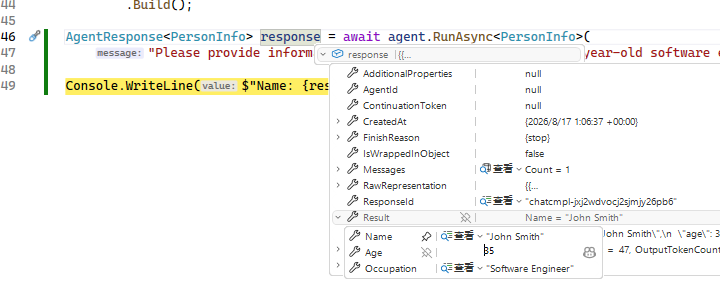
看一眼 SDK 源码(AIAgentStructuredOutput.cs)就清楚了,使用泛型 RunAsync<T> 时,MAF 框架默认会开启 JsonSchema 能力。
// 源码位置:src/Microsoft.Agents.AI.Abstractions/AIAgentStructuredOutput.cs
public async Task<AgentResponse<T>> RunAsync<T>(
    IEnumerable<ChatMessage> messages, ...)
{
    serializerOptions ??= AgentAbstractionsJsonUtilities.DefaultOptions;

    // 1. 把 T 编译成 JSON Schema,生成 response_format
    var responseFormat = ChatResponseFormat.ForJsonSchema<T>(serializerOptions);

    // 2. 处理"非对象根"问题(下面单独讲)
    (responseFormat, bool isWrappedInObject) =
        StructuredOutputSchemaUtilities.WrapNonObjectSchema(responseFormat);

    // 3. 把 response_format 塞进本次运行的 options
    options = options?.Clone() ?? new AgentRunOptions();
    options.ResponseFormat = responseFormat;

    // 4. 走普通 RunAsync,让底层把 response_format 透传给模型
    AgentResponse response = await this.RunAsync(messages, session, options, cancellationToken);

    // 5. 返回一个会"按需反序列化"的 AgentResponse<T>
    return new AgentResponse<T>(response, serializerOptions) { IsWrappedInObject = isWrappedInObject };
}
整个链路就是:C# 类型 → JSON Schema → response_format → 透传给模型 → 受限解码生成 → 反序列化回对象。
MAF 做的是两头:类型⇄Schema、JSON⇄对象,中间那段受限解码是模型自己干的。
这是个容易被坑的点。前面讲受限解码时提过,所有主流模型都要求 schema 的根是一个 object。这意味着你直接让模型返回一个 int 或者 List<string> 是不行的,schema 根不是 object,模型会拒绝。
但 RunAsync<int>、RunAsync<List<string>> 看起来又很合理。
MAF 在客户端上支持了这种非 object 的模式,MAF 的处理是偷偷把你的非 object schema 包进一个 data 字段里。这件事在 StructuredOutputSchemaUtilities.WrapNonObjectSchema 里完成:
// 源码位置:src/Shared/StructuredOutput/StructuredOutputSchemaUtilities.cs
if (!SchemaRepresentsObject(responseFormat.Schema))
{
    // 非 object 根,包一层:{ "data": <你原本的 schema> }
    isWrappedInObject = true;
    schema = JsonSerializer.SerializeToElement(new JsonObject
    {
        { "$schema", "https://json-schema.org/draft/2020-12/schema" },
        { "type", "object" },
        { "properties", new JsonObject { { "data", JsonElementToJsonNode(schema) } } },
        { "additionalProperties", false },
        { "required", new JsonArray("data") },
    }, ...);
}
对应的,反序列化时(AgentResponse<T>.Result)会先把 data 字段拆出来再反序列化成 T。所以你用 RunAsync<List<string>> 时,模型实际输出的是 {"data": ["a","b"]},但 response.Result 拿到的就是干干净净的 List<string>,包装/拆包对你不可见。
但是还是建议改用一个包装类型:
// ResponseFormat 方式下,别直接用 List<string>,包一层
public class MovieListWrapper
{
    public List<string> Movies { get; set; }
}
ResponseFormat
RunAsync<T> 要求编译时就知道类型。但有时你手头只有一份 JSON Schema 字符串,比如从配置文件加载的声明性代理,或者我们正在做工作流,或者你根本不想要对象、只要 JSON 文本,这时就用 ResponseFormat。
ResponseFormat 有三档:
| 取值 | 含义 |
|---|---|
ChatResponseFormat.Text | 纯文本(默认行为) |
ChatResponseFormat.Json | 保证是合法 JSON,但不带特定 schema |
ChatResponseFormat.ForJsonSchema(...) | 带特定 schema 的 JSON |
ResponseFormat 可以在两个地方设置:
运行时设置(单次调用生效):
using System.Text.Json;
using Microsoft.Extensions.AI;

AgentRunOptions runOptions = new()
{
    ResponseFormat = ChatResponseFormat.ForJsonSchema<PersonInfo>()
};

AgentResponse response = await agent.RunAsync(
    "Please provide information about John Smith, who is a 35-year-old software engineer.",
    options: runOptions);

// 注意:这种方式拿到的 response.Text 是 JSON 字符串,要自己反序列化
PersonInfo personInfo = JsonSerializer.Deserialize<PersonInfo>(response.Text, JsonSerializerOptions.Web)!;
或者用原始 JSON Schema 字符串(没有对应 .NET 类型时很有用,比如声明性代理从外部加载 schema):
string jsonSchema = """
{
    "type": "object",
    "properties": {
        "name": { "type": "string" },
        "age": { "type": "integer" },
        "occupation": { "type": "string" }
    },
    "required": ["name", "age", "occupation"]
}
""";

AgentRunOptions runOptions = new()
{
    ResponseFormat = ChatResponseFormat.ForJsonSchema(
        JsonElement.Parse(jsonSchema), "PersonInfo", "Information about a person")
};

AgentResponse response = await agent.RunAsync(
    "Please provide information about John Smith, who is a 35-year-old software engineer.",
    options: runOptions);

JsonElement result = JsonSerializer.Deserialize<JsonElement>(response.Text);
Console.WriteLine($"Name: {result.GetProperty("name").GetString()}");
代理初始化时设置(所有运行生效):
AIAgent agent = ...
        .AsAIAgent(new ChatClientAgentOptions()
        {
            Name = "HelpfulAssistant",
            ChatOptions = new()
            {
                ModelId = "qwen/qwen3.5-9b",
                Instructions = "You are a helpful assistant.",
                ResponseFormat = ChatResponseFormat.ForJsonSchema<PersonInfo>()  // 代理级别
            }
        });
流式输出的结构化
流式场景有个绕不开的矛盾,结构化输出要求完整对象,流式输出给的是碎片。一个 JSON 对象在被切成几百个 token 碎片后,任何一片单独看都不是合法 JSON,没法逐片反序列化。
MAF 的处理很直白,先把所有碎片合并成一个完整响应,再一次性反序列化。
using System.Text.Json;
using Microsoft.Extensions.AI;

AIAgent agent = ...
        .AsAIAgent(new ChatClientAgentOptions()
        {
            Name = "HelpfulAssistant",
            ChatOptions = new()
            {
                ModelId = "qwen/qwen3.5-9b",
                Instructions = "You are a helpful assistant.",
                ResponseFormat = ChatResponseFormat.ForJsonSchema<PersonInfo>()
            }
        });

// 流式收到的是一系列更新,逐片到达
IAsyncEnumerable<AgentResponseUpdate> updates = agent.RunStreamingAsync(
    "Please provide information about John Smith, who is a 35-year-old software engineer.");

// ToAgentResponseAsync 内部把所有碎片合并成一个完整响应
AgentResponse response = await updates.ToAgentResponseAsync();

// 合并完才能反序列化
PersonInfo personInfo = JsonSerializer.Deserialize<PersonInfo>(response.Text)!;
Console.WriteLine($"Name: {personInfo.Name}, Age: {personInfo.Age}, Occupation: {personInfo.Occupation}");