
Embedding 与向量检索
讲到 AI 平台,最离不开的就是知识库、知识图谱了,它们的底层都是 Embedding。
举例:
- 客服 Agent,用户问 "你们家退货政策是什么",你得先从内部知识库里捞出来 "30 天内可退……" 这段话,再让模型基于这段话组织回答。
- 文档问答 Agent,用户问 "MAF 怎么连 Ollama" ,你得先在你写的几十篇 markdown 里检索到 连接大模型 那一节,再让模型作答。
- 代码库问答 Agent,用户问 "历史记录压缩在哪实现的" ,你得在几千个源文件里捞到相关文件。
如果只是简单地把一个 PDF 或者 一篇文章整体塞给模型,模型上下文有限(且越长越贵越慢),资料一多根本塞不下。
RAG 的核心思路是,不把资料全塞给模型,而是先检索出最相关的几小段,只把这几段塞进去。这样既绕开了上下文长度限制,又把无关噪音挡在了外面。
Embedding 就是把任意一段文本,映射成一个固定长度的浮点数组(向量)。关键是:语义相近的文本,向量在空间里也相近。
"如何退货"            ──►  [0.12, -0.55, 0.88, ..., 0.03]   (2560 维)
"退款政策是什么"       ──►  [0.10, -0.50, 0.90, ..., 0.05]   ← 和上面很接近
"今天天气不错"         ──►  [-0.71, 0.22, -0.10, ..., 0.66]  ← 和上面差很远
简单来说就是大模型有一个词表,当你输入一段话给模型时,模型会对照词表生成一段固定维度的向量,如果两段文字语义或内容比较接近,那么它们最终生成的向量也会比较接近。
每家厂商的不同系统模型使用的词表都可能不一样,因此,不同的嵌入模型对同一段话生成的向量也不一样。所以一个 RAG 使用一个模型生成向量后,不可以使用别的模型进行检索,同一个 RAG 知识库只能使用固定的一个模型处理知识以及检索。
这里不介绍底层的词表、稠密向量,感兴趣的读者自行学习大模型知识。
IEmbeddingGenerator统一抽象
和 IChatClient 之于对话一样,embedding 在 .NET 生态里也有一个统一抽象:Microsoft.Extensions.AI.IEmbeddingGenerator<TInput, TEmbedding>。
任何厂家的 embedding 服务,最后都能被适配成这个接口。
创建 IEmbeddingGenerator 示例:
using Microsoft.Extensions.AI;
using OpenAI;

OpenAIClient openAI = new OpenAIClient(
    credential: new ApiKeyCredential("1234"),
    options: new OpenAIClientOptions { Endpoint = new Uri("http://127.0.0.1:1234/v1") });

IEmbeddingGenerator<string, Embedding<float>> embeddingGenerator =
    openAI.GetEmbeddingClient("text-embedding-qwen3-embedding-4b").AsIEmbeddingGenerator();
.AsIEmbeddingGenerator() 这个扩展方法来自 Microsoft.Extensions.AI.OpenAI 包,它把 OpenAI 系的 EmbeddingClient 包装成统一的 IEmbeddingGenerator。
获得 IEmbeddingGenerator 后,我们可以通过 GenerateAsync() 把一段文字转换为向量。
foreach (Embedding<float> embedding in
    await embeddingGenerator.GenerateAsync(["What is AI?", "What is .NET?"]))
{
    Console.WriteLine(string.Join(", ", embedding.Vector.ToArray()));
}
请求内容:
{
	"input": ["What is AI?", "What is .NET?"],
	"model": "text-embedding-qwen3-embedding-4b",
	"encoding_format": "base64"
}
模型响应:
{
  "object": "list",
  "data": [
    {
      "object": "embedding",
      "embedding": [
        0.00010228167229797691,
        -0.015106133185327053,
        -0.016197847202420235,
        0.003717052051797509,
        ...
        ...
向量存储 VectorStore
IEmbeddingGenerator 返回只有一段数学上的向量,如果我们要做 RAG,需要设计数据库表、设计字段和各类内容,把向量和关联信息存储起来,后续才能实现向量相似度检索以及数据召回。
不过这些功能实现起来会非常麻烦,所以 MAF 提供了一套抽象,可以很轻松帮助我们实现存储设计。
MAF 框架直接用了 Microsoft.Extensions.VectorData 这套抽象,然后封装了两个核心类型:
| 类型 | 作用 |
|---|---|
VectorStore | 向量库的根对象,相当于"一个数据库实例" |
VectorStoreCollection<TKey, TRecord> | 一个集合(可以类比成"一张表"),真正的增删查都在这上面 |
例如我们要设计一个 RAG 的表,表里面有多个字段,首先得有 key,要存储向量和这个向量的原文,要附加元数据等。
参考以下结构:
using Microsoft.Extensions.VectorData;

// 一条文档切片:建库时存进去,查询时取出来
internal sealed class DocumentationChunk
{
    [VectorStoreKey]
    public Guid Key { get; set; }          // ① 主键:唯一标识这条记录

    [VectorStoreData(IsIndexed = true)]
    public string SourceName { get; set; } = string.Empty;   // ② 数据字段:可筛选/可展示的元数据

    [VectorStoreData(IsFullTextIndexed = true)]
    public string Text { get; set; } = string.Empty;         // ② 数据字段:原文,全文检索 + 喂给模型

    [VectorStoreData(IsIndexed = true)]
    public List<string> Tags { get; set; } = new();          // ② 数据字段:标签,支持按标签过滤

    // ③ 向量字段:声明维度,类型是 string、值是 this.Text
    [VectorStoreVector(dimensions: 2560, DistanceFunction = DistanceFunction.CosineSimilarity, IndexKind = IndexKind.Hnsw)]
    public string Embedding => this.Text;
}
我们第一步就是通过三个特性注解,实现我们的存储结构,这个结构跟数据库是抽象隔离的,我们不需要关心在 Redis、Postgres、MongoDB 存储的表和结构,我们只需要关注代码模型结构即可,具体创建表和生成存储结构的逻辑,由框架完成。
三个特性注解说明:
| 特性 | 角色 | 必填 | 可选属性 | 说明 |
|---|---|---|---|---|
[VectorStoreKey] | 主键 | — | IsAutoGenerated、StorageName | 唯一标识一条记录。IsAutoGenerated=true 让数据库自动生成(如自增 id) |
[VectorStoreData] | 普通数据字段 | — | IsIndexed、IsFullTextIndexed、StorageName | 存原文、元数据、标签等。"普通字段"和向量字段相对,它不参与向量相似度计算 |
[VectorStoreVector] | 向量字段 | Dimensions | DistanceFunction、IndexKind、StorageName | 真正参与"相似度检索"的字段,存的是(或由文本生成)向量 |
一个模型只能有一个 [VectorStoreKey] 和一个 [VectorStoreVector],普通字段 [VectorStoreData] 可以有多个,我们可以用于存储元数据或原文内容。
[VectorStoreData] 有几个重要的属性:
IsIndexed = true:给这个字段建等值/范围索引,用于过滤和提高检索速度。IsFullTextIndexed = true:给这个字段建全文索引,用于关键词检索/混合检索。它让Text这种长文本可以被关键词命中。注意:不是所有向量库都支持全文索引(Redis Stack、Postgres 支持,纯向量库如 Qdrant 支持有限)。StorageName:字段在数据库里的实际列名/key 名,和 C# 属性名解耦。比如属性叫Text,想存成content,就设StorageName = "content"。某些库(如 Redis 的 JSON 模式)更推荐用[JsonPropertyName],按各连接器文档来。
[VectorStoreVector] 的关键参数
向量字段是最特殊的一类,逐个参数讲:
-
Dimensions(必填):向量维度,必须等于 embedding 模型实际输出维度。Qwen3-Embedding-4B默认填 2560,text-embedding-3-large填 3072。填错建索引直接报错。 -
DistanceFunction:相似度度量方式。是Microsoft.Extensions.VectorData.DistanceFunction这个静态类提供的字符串常量(注意:不是 enum,是const string,赋值写作DistanceFunction = DistanceFunction.CosineSimilarity)。常用值:常量 含义 适用场景 CosineSimilarity余弦相似度 最常用,关注方向而非大小,文本检索默认选它 DotProductSimilarity点积相似度 向量已归一化时,等价余弦但更快 EuclideanDistance/EuclideanSquaredDistance欧氏距离 图像/数值向量常用 ManhattanDistance、HammingDistance等曼哈顿/汉明距离 特殊场景(二值向量等) -
IndexKind:向量索引算法,同样是IndexKind静态类的const string:常量 含义 适用场景 Hnsw分层可导航小世界图 最常用,查询快、精度高,适合大多数规模 Flat暴力遍历 数据量小,精确但慢 IvfFlat、DiskAnn、QuantizedFlat等倒排/磁盘/量化索引 海量数据、内存受限场景,各库支持程度不同
距离函数和索引类型并非每个向量库都全支持,具体能用哪些要看连接器文档。比如 Redis Stack 主要支持 HNSW 和 Flat;Postgres/pgvector 支持 HNSW 和 IVFFlat。不指定时各库有自己的默认值(通常是 HNSW + Cosine)。写了不支持的值,连接器会抛异常。
存储模型的字段要投影到数据库,就不能随意使用各种类型,我们要注意。
| 角色 | 支持的 CLR 类型 |
|---|---|
[VectorStoreKey] | string、Guid、int、long、ulong(InMemory/Redis 常用 string/Guid) |
[VectorStoreData] | 基元:string、int、long、double、float、bool、DateTime、DateTimeOffset、Guid、枚举集合: List<T>、T[]但元素 T 必须是基元(如 List<string>、string[]),常做标签/分类 |
[VectorStoreVector] | ReadOnlyMemory<float>?、ReadOnlyMemory<double>?、float[]、double[]、Embedding<float>/<double>、以及 string(自动 embed) |
核心限制:数据字段不能装复杂/自定义类型,无论直接放还是套在集合里。 也就是说,下面这几种写法都不行:
public class AuthorInfo { public string Name { get; set; } public string Email { get; set; } }

internal sealed class DocumentationChunk
{
    [VectorStoreKey]
    public Guid Key { get; set; }

    // ❌ 错误:直接把一个自定义类作为数据字段
    [VectorStoreData]
    public AuthorInfo Author { get; set; } = new();

    // ❌ 同样错误:套在集合里也不行,元素 AuthorInfo 不是基元
    [VectorStoreData]
    public List<AuthorInfo> Authors { get; set; } = new();

    // ❌ 同样错误:Dictionary 的值是复杂类型也不行
    [VectorStoreData]
    public Dictionary<string, string> Metadata { get; set; } = new();
}
动态 schema
如果你在编译期不知道 schema(比如从配置文件加载),可以不定义存储模型,改用 VectorStoreCollectionDefinition + Dictionary<string, object?> 动态拼装模型结构。
VectorStoreCollectionDefinition definition = new()
{
    Properties =
    [
        new VectorStoreKeyProperty("Key", typeof(string)),
        new VectorStoreDataProperty("Text", typeof(string)) { IsFullTextIndexed = true },
        new VectorStoreDataProperty("Tags", typeof(List<string>)) { IsIndexed = true },
        new VectorStoreVectorProperty("TextEmbedding", typeof(string), dimensions: 2560),
    ]
};

var collection = vectorStore.GetDynamicCollection("mydocs", definition);
// 返回类型是 VectorStoreCollection<object, Dictionary<string, object?>>
// 读写按字典 key:record["Text"] = "..."
VectorStoreKeyProperty / VectorStoreDataProperty / VectorStoreVectorProperty 的属性(IsIndexed、IsFullTextIndexed、Dimensions、IndexKind、DistanceFunction、StorageName)和特性版完全对应,只是改成了对象属性赋值。
写入和检索
检索时也不是什么黑盒,就是:
- 拿用户的查询文本,用同一个 embedding 模型算出一个查询向量。
- 在库里挨个算这个查询向量和每条记录向量的相似度。
- 按相似度从高到低取前 k 条,把对应的原文返回。
有了数据模型,写入和检索的代码非常简单。
例如我们将数据存储到内存,那么如何检索。
需要安装
CommunityToolkit.VectorData.InMemory包。
IEmbeddingGenerator<string, Embedding<float>> embeddingGenerator =
    openAI.GetEmbeddingClient("text-embedding-qwen3-embedding-4b").AsIEmbeddingGenerator();

// 创建向量库,把 embedding 生成器交给它(写入/查询时会自动调)
VectorStore vectorStore = new InMemoryVectorStore(new()
{
    EmbeddingGenerator = embeddingGenerator
});

string content = "痴者工良是有趣的博主,小小程序员,业余摄影师,主要研究微服务架构、人工智能 AI、Kubernetes、Istio、DevOps 等,主要语言是 C#、Go、Python。\r\n日常喜欢看书、写博客、摄影、运动、撸猫、旅游。";

// 拿到名为 mydocs 的知识库
VectorStoreCollection<Guid, DocumentationChunk> collection =
    vectorStore.GetCollection<Guid, DocumentationChunk>("mydocs");
await collection.EnsureCollectionExistsAsync();   // 不存在则建

// 写入:把切好的文档片段塞进去。UpsertAsync 自动给每条的 Embedding 字段算向量
await collection.UpsertAsync(new DocumentationChunk
{
    Key = Guid.NewGuid(),
    SourceName = "autor",
    Text = content,
    Tags = new List<string> { "痴者工良", "个人介绍" }
});

// 4. 检索:传一段文本,库自动算它的查询向量,返回最相似的 5 条
await foreach (var result in collection.SearchAsync("痴者工良有什么兴趣爱好", top: 5))
{
    Console.WriteLine($"{result.Score:F3}  {result.Record.Text}");
    // result.Score 是相似度分数(余弦相似度下,越大越相关)
}
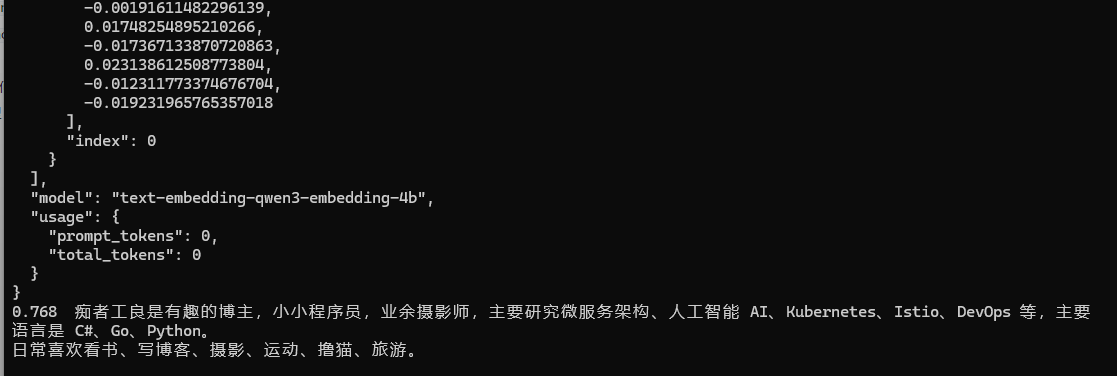
在整条链路中,我们并不需要自己使用 IEmbeddingGenerator.GenerateEmbeddingAsync() 手动构建向量,VectorStoreCollection 提供了一套抽象,我们只需要很简单的代码,即可实现把一段文字向量化后存储到内存中。
检索功能也非常简单,collection.SearchAsync("痴者工良有什么兴趣爱好", top: 5) 要求召回五个最相近的内容。
当然除了文字,图片、视频、音频也可以向量化,不过这里就不展开讲解了。
InMemoryVectorStore 进程一退数据就没了,真实业务得用一个能持久化、能多进程共享的向量库。所以接下来笔者会讲解怎么连接 Redis Stack 和 Postgres ,持久化存储数据。
Redis Stack
Redis Stack 在普通 Redis 基础上多了 RediSearch 模块,支持向量索引和全文检索。连接器包是 CommunityToolkit.VectorData.Redis(旧名 Microsoft.SemanticKernel.Connectors.Redis),类是 RedisVectorStore,构造时传入 StackExchange.Redis 的 IDatabase:
CommunityToolkit.VectorData.Redis
StackExchange.Redis
修改 DocumentationChunk,Redis 扩展库不支持 string 自动 Embedding。
internal sealed class DocumentationChunk
{
    [VectorStoreKey]
    public Guid Key { get; set; }

    [VectorStoreData(IsIndexed = true)]
    public string SourceName { get; set; } = string.Empty;

    [VectorStoreData(IsFullTextIndexed = true)]
    public string Text { get; set; } = string.Empty;

    [VectorStoreData(IsIndexed = true)]
    public List<string> Tags { get; set; } = new();

    [VectorStoreVector(dimensions: 2560, DistanceFunction = DistanceFunction.CosineSimilarity, IndexKind = IndexKind.Hnsw)]
    public ReadOnlyMemory<float> Embedding { get; set; }
}
需要手动 Embedding,存储到 DocumentationChunk。
IEmbeddingGenerator<string, Embedding<float>> embeddingGenerator =
    openAI.GetEmbeddingClient("text-embedding-qwen3-embedding-4b").AsIEmbeddingGenerator();


IDatabase redis = ConnectionMultiplexer
    .Connect("192.168.50.199:6379")
    .GetDatabase();

RedisVectorStore vectorStore = new(redis, new RedisVectorStoreOptions
{
    EmbeddingGenerator = embeddingGenerator
});

string content = "痴者工良是有趣的博主,小小程序员,业余摄影师,主要研究微服务架构、人工智能 AI、Kubernetes、Istio、DevOps 等,主要语言是 C#、Go、Python。\r\n日常喜欢看书、写博客、摄影、运动、撸猫、旅游。";

GeneratedEmbeddings<Embedding<float>> embedding = await embeddingGenerator.GenerateAsync([content]);

VectorStoreCollection<Guid, DocumentationChunk> collection =
    vectorStore.GetCollection<Guid, DocumentationChunk>("mydocs");
await collection.EnsureCollectionExistsAsync();

await collection.UpsertAsync(new DocumentationChunk
{
    Key = Guid.NewGuid(),
    SourceName = "autor",
    Text = content,
    Tags = new List<string> { "痴者工良", "个人介绍" },
    Embedding = embedding[0].Vector
});

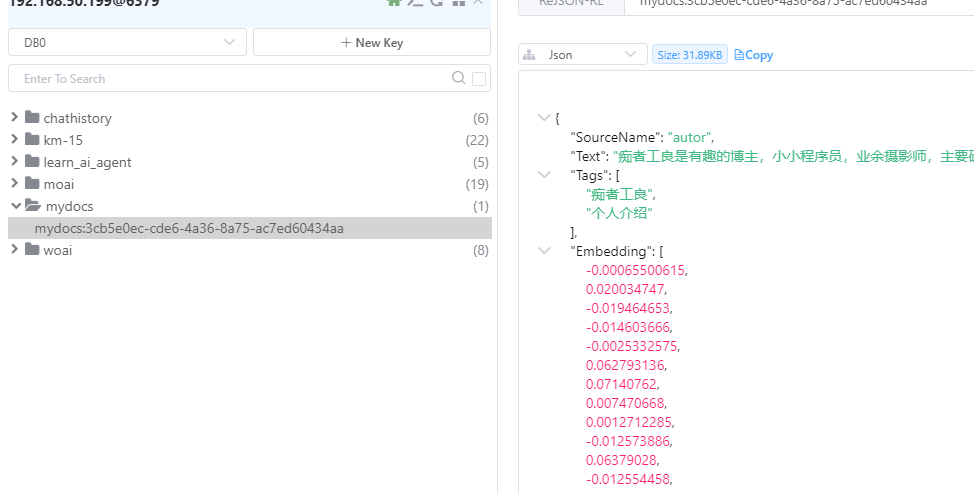
await foreach (var result in collection.SearchAsync("痴者工良有什么兴趣爱好", top: 5))
{
    Console.WriteLine($"{result.Score:F3}  {result.Record.Text}");
}
Postgres + pgvector
Pgvector 的向量索引限制了最大 2000,所以我们需要修改 DocumentationChunk ,这里笔者也建议 dimensions 使用1000-2000 即可,RAG 文字切片一般需要比 dimensions 大一些。
笔者本地的 LM Studio 不支持自定义维度。
这里说的是 Postgres 的向量索引最大 2000,而不是向量维度最大 2000,如果不需要把向量字段设置为索引,则不可以把 2000 调大一些。
internal sealed class DocumentationChunk
{
    [VectorStoreKey]
    public Guid Key { get; set; }

    [VectorStoreData(IsIndexed = true)]
    public string SourceName { get; set; } = string.Empty;

    [VectorStoreData(IsFullTextIndexed = true)]
    public string Text { get; set; } = string.Empty;

    [VectorStoreData(IsIndexed = true)]
    public List<string> Tags { get; set; } = new();

    [VectorStoreVector(dimensions: 1536, DistanceFunction = DistanceFunction.CosineSimilarity, IndexKind = IndexKind.Hnsw)]
    public ReadOnlyMemory<float> Embedding { get; set; }
}
Postgres 的使用模式跟前面两种都不太一样,因为向量维度有限制,所以我们需要在不少地方配置好使用的 Dimensions 大小,并且检索数据库时,使用 Embedding 搜索,而不是传递一段文本。
# 安装包
CommunityToolkit.VectorData.PgVector
Npgsql
IEmbeddingGenerator<string, Embedding<float>> embeddingGenerator =
    openAI.GetEmbeddingClient("qwen3.7-text-embedding").AsIEmbeddingGenerator(defaultModelDimensions: 1536);

PostgresVectorStore vectorStore = new("Host=127.0.0.1;Port=5432;Username=postgres;Password=1234;Database=testv");

string content = "痴者工良是有趣的博主,小小程序员,业余摄影师,主要研究微服务架构、人工智能 AI、Kubernetes、Istio、DevOps 等,主要语言是 C#、Go、Python。\r\n日常喜欢看书、写博客、摄影、运动、撸猫、旅游。";

GeneratedEmbeddings<Embedding<float>> embedding = await embeddingGenerator.GenerateAsync([content], options: new EmbeddingGenerationOptions
{
    Dimensions = 1536
});

VectorStoreCollection<Guid, DocumentationChunk> collection =
    vectorStore.GetCollection<Guid, DocumentationChunk>("mydocs");
await collection.EnsureCollectionExistsAsync();

await collection.UpsertAsync(new DocumentationChunk
{
    Key = Guid.NewGuid(),
    SourceName = "autor",
    Text = content,
    Tags = new List<string> { "痴者工良", "个人介绍" },
    Embedding = embedding[0].Vector
});

// 检索:先把查询文本算成向量,再传给 SearchAsync(向量搜索不认 string)
var queryEmbedding = await embeddingGenerator.GenerateAsync("痴者工良有什么兴趣爱好");
await foreach (var result in collection.SearchAsync(queryEmbedding, top: 5))
{
    Console.WriteLine($"{result.Score:F3}  {result.Record.Text}");
}
把检索接进 Agent
做 Agent 时,如果要把 RAG 能力提供给 Agent,有两种方式为 Agent 注入能力。
| 策略 | 一句话 | 谁决定查什么 | 何时查 |
|---|---|---|---|
| A. 上下文注入 | 每次都先查好,把结果当上下文塞进请求 | 代码(无脑查) | 每轮必查 |
| B. 工具调用 | 给模型一个 Search 工具,让它自己决定查不查、查什么 | 模型(按需查) | 模型说了算 |
一般来说都是注册一套工具,让 Agent 自行决定调用的,不过第一种方式在工作流或者固定流程模式下,也很有用,因此两者都简单介绍一下。
MAF 的 TextSearchProvider 同时实现了这两种策略,它本身是一个 AIContextProvider,挂在 Agent 上之后,在每次调模型前被自动触发。两种策略的区别,仅在于这个 provider 往请求里塞的是 已经检索好的上下文消息 还是一个待模型调用的检索工具,由 TextSearchProviderOptions.SearchTime 一个开关决定:
SearchTime 取值 | 对应策略 | provider 往请求里塞什么 |
|---|---|---|
BeforeAIInvoke(默认) | A 上下文注入 | 一条消息(检索结果格式化后的文本) |
OnDemandFunctionCalling | B 工具调用 | 一个工具(名为 Search 的 function tool) |
检索逻辑是解耦的(两种策略共用)
无论选哪种策略,TextSearchProvider 的构造方式都一样,第一个参数是一个检索委托,它不关心你背后用什么向量库。
// TextSearchProvider 只认这个委托签名,背后是 Redis 还是 Qdrant 它根本不知道
public TextSearchProvider(
    Func<string, CancellationToken, Task<IEnumerable<TextSearchResult>>> searchAsync,
    TextSearchProviderOptions? options = null,
    ILoggerFactory? loggerFactory = null)
这意味着你可以把任何数据源包成这个委托塞进去,向量库、全文搜索引擎。这种解耦让你可以先用 mock 把 Agent 跑通,再慢慢接真实向量库。委托返回的 TextSearchResult 只有几个核心字段:
public sealed class TextSearchResult
{
    public string? SourceName { get; set; }      // 来源名,比如 "退货政策.pdf"
    public string? SourceLink { get; set; }      // 来源链接,用于让模型引用出处
    public string? Text { get; set; }            // 真正的正文片段
    public object? RawRepresentation { get; set; } // 原始记录,给你自己用的
}
这个检索委托是两种策略唯一的共用部分。策略 A 拿它的返回值格式化成消息;策略 B 把它包成一个 tool,模型调用 tool 时由 MAF 内部执行它。下面分别看怎么配。
下面把两种策略的完整配法都写出来。先准备一个共用的检索委托(两种策略都用它):
// 把向量库检索包成委托:给一段查询文本,返回一组结果
Func<string, CancellationToken, Task<IEnumerable<TextSearchProvider.TextSearchResult>>> searchAdapter =
    async (query, ct) =>
    {
        // 检索:先把查询文本算成向量,再传给 SearchAsync(向量搜索不认 string)
        var queryEmbedding = await embeddingGenerator.GenerateAsync(query);

       var results = new List<TextSearchProvider.TextSearchResult>();
        await foreach (var hit in collection.SearchAsync(queryEmbedding, top: 5, cancellationToken: ct))
        {
            results.Add(new TextSearchProvider.TextSearchResult
            {
                SourceName = hit.Record.SourceName,
                SourceLink = hit.Record.Tags[0],
                Text = hit.Record.Text,
                RawRepresentation = hit
            });
        }
        return results;
    };
上下文注入(BeforeAIInvoke)
最省心的方式。把 SearchTime 设为 BeforeAIInvoke,挂到 Agent 上,之后你照常 RunAsync,每轮调模型前 MAF 自动检索、自动拼上下文、自动注入,对调用方完全透明:
TextSearchProviderOptions options = new()
{
    SearchTime = TextSearchProviderOptions.TextSearchBehavior.BeforeAIInvoke,
    RecentMessageMemoryLimit = 5
};


AIAgent agent = openAI.GetChatClient("qwen3.8-max").AsAIAgent(new ChatClientAgentOptions
{
    ChatOptions = new() { Instructions = "基于上下文回答,找不到就说不知道" },
    AIContextProviders = [new TextSearchProvider(searchAdapter, options)]
});

Console.WriteLine(await agent.RunAsync("痴者工良喜欢做什么"));
每轮内部发生的事:provider 拿用户消息 → 调 searchAdapter 检索 → 把结果格式化成 "## Additional Context\n..." → 作为一条 user 消息插到请求里 → 连同原消息一起发给模型。
适合场景:问题领域固定、几乎每轮都要查资料(客服、文档问答、知识库助手)。优点是稳定可控,模型一定能拿到资料;缺点是不管需不需要都查,费 token、费调用,且检索质量完全取决于代码的查询构造能力。
工具调用(OnDemandFunctionCalling)
这是你倾向于用的方式,不给模型硬塞上下文,而是把检索能力做成一个 tool,让模型自己决定要不要查、查什么。配法几乎一样,只改 SearchTime:
TextSearchProviderOptions options = new()
{
    SearchTime = TextSearchProviderOptions.TextSearchBehavior.OnDemandFunctionCalling,
    // 这两个选项只在策略 B 下有意义:自定义暴露给模型的工具名和描述
    FunctionToolName = "SearchDocs",
    FunctionToolDescription = "在知识库里检索相关文档。"
};


AIAgent agent = openAI.GetChatClient("qwen3.8-max").AsAIAgent(new ChatClientAgentOptions
{
    ChatOptions = new() { Instructions = "基于上下文回答,找不到就说不知道" },
    AIContextProviders = [new TextSearchProvider(searchAdapter, options)]
});

Console.WriteLine(await agent.RunAsync("痴者工良喜欢做什么"));