
连接大模型
在计算机科学中,有句话是,计算机领域中的问题都可以抽象一层来解决,如果不行,就两层。
Microsoft 一开始做了 SemanticKernel 框架,用起来非常别扭、粗糙,很多东西都得自己想办法解决,需要自己处理连接不同厂家模型协议,导致编写的程序非常复杂。
做 Agent 开发时,最让人头疼的第一件事往往不是 Agent 的设计,而是怎么把不同厂家的模型接进来。OpenAI 有一套 SDK,Azure OpenAI 又有一套,Anthropic 是另一套,本地跑个 Ollama 又是另一套,每家客户端类型、认证方式、返回结构都不一样。
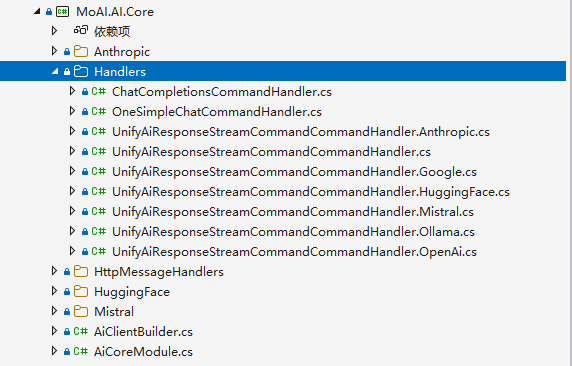
笔者使用 SemanticKernel 编写 MoAI 项目时,接口格式得自己解析,非常麻烦。
不过官方似乎也不维护 SemanticKernel 了。
好在 Microsoft 重新设计了一个 Microsoft 框架,统一了接入层抽象,设计了一套消息格式桥接各家模型厂商的接口协议,将不同的接口格式都归一化成一个 ChatClientAgent 对象。你只需要关心连接阶段,剩下的对话、流式、工具调用、上下文管理,全都是同一套 API,减少开发者负担。
下面各厂家接入方式汇总,有些 SDK 实现了 Microsoft.Extensions.AI 的 IChatClient。
| 厂家 | 原生客户端 | 桥接包 | 认证方式 | 关键方法 |
|---|---|---|---|---|
| Azure OpenAI | AzureOpenAIClient | Microsoft.Agents.AI.OpenAI | Azure 凭据 / API Key | GetChatClient(部署名).AsAIAgent(...) |
| OpenAI 公网 | OpenAIClient | Microsoft.Agents.AI.OpenAI | API Key | GetChatClient(模型).AsAIAgent(...) |
| GitHub Models | OpenAIClient + 自定义 endpoint | Microsoft.Agents.AI.OpenAI | GitHub Token | 同上,换 endpoint |
| Azure AI Foundry | AIProjectClient | Microsoft.Agents.AI.Foundry | Azure 凭据 | AsAIAgent(model:..., ...) |
| Foundry 第三方模型 | OpenAIClient + 自定义 endpoint | Microsoft.Agents.AI.OpenAI | API Key / Bearer Token | 同 OpenAI 写法 |
| Anthropic | AnthropicClient | Microsoft.Agents.AI.Anthropic | API Key | AsAIAgent(model:..., ...) |
| Ollama | OllamaApiClient / OllamaChatClient | 无(原生 IChatClient) | 无 | AsAIAgent(...) 通用扩展 |
| Google Gemini | Google.GenAI.Client | 无(原生 IChatClient) | API Key | AsIChatClient(model).AsAIAgent(...) |
虽然接入方式统一了,但不同厂家背后的模型能力并不对等,表格来源于官方文档。
| 提供程序 | 函数工具 | 结构化输出 | 代码解释器 | 文件搜索 | MCP 工具 | 后台响应 |
|---|---|---|---|---|---|---|
| Azure OpenAI | ✅ | ✅ | ✅ | ✅ | ✅ | ✅ |
| OpenAI | ✅ | ✅ | ✅ | ✅ | ✅ | ✅ |
| Microsoft Foundry | ✅ | ✅ | ✅ | ✅ | ✅ | ✅ |
| Anthropic | ✅ | ✅ | ✅ | ❌ | ✅ | ❌ |
| Ollama | ✅ | ✅ | ❌ | ❌ | ❌ | ❌ |
| Foundry Local | ✅ | ❌ | ❌ | ❌ | ❌ | ❌ |
| GitHub Copilot | ✅ | ❌ | ❌ | ❌ | ✅ | ❌ |
| Copilot Studio | ✅ | ❌ | ❌ | ❌ | ❌ | ❌ |
统一抽象:IChatClient 与 ChatClientAgent
官方 nuget 包名称:
Microsoft.Agents.AI
在动手连厂家之前,先理解 MAF 的两层抽象,这是后面所有章节学习的基础。
第一层:IChatClient。 它来自 Microsoft.Extensions.AI 这个包,定义了一个极简的聊天接口——输入消息、输出响应(支持流式和非流式)。关键在于,它和具体厂商无关。OpenAI 的 ChatClient、Anthropic 的 AnthropicClient、Ollama 的 OllamaApiClient,最终都会被适配成一个 IChatClient。
第二层:ChatClientAgent。 它是 MAF 里的核心 Agent 类型,位于命名空间 Microsoft.Agents.AI,继承自抽象基类 AIAgent。ChatClientAgent 内部持有一个 IChatClient,在这个 IChatClient 之上叠加了指令(instructions)、工具(tools)、对话历史、中间件等 Agent 能力。
要注意,IChatClient 是 Microsoft.Extensions.AI 的抽象,功能很少,只有基本几个函数。而 ChatClientAgent 才是 MAF 框架的抽象,实际上我们开发 Agent 时都使用 ChatClientAgent,或者把 IChatClient 转换为 ChatClientAgent 。
MAF 框架是这样统一接入层的:
┌─────────────────────────────────────────────────┐
│              ChatClientAgent (AIAgent)          │
│   instructions / tools / chat history / 中间件   │
│                                                 │
│   ┌─────────────────────────────────────────┐   │
│   │            IChatClient                  │   │
│   │   (Microsoft.Extensions.AI 抽象)         │   │
│   └──────────────┬──────────────────────────┘   │
└──────────────────┼──────────────────────────────┘
                   │  AsIChatClient() / 原生实现
     ┌─────────────┼─────────────┐
     ▼             ▼             ▼
 OpenAI SDK   Anthropic SDK   Ollama ...
所以接入任意厂家的流程都只有三步:
- 安装对应厂家的 NuGet 包。
- 使用该厂家的 SDK 构建客户端类型。
- 得到 IChatClient,或者直接将原始客户端类型调用
AsAIAgent(...)扩展方法,得到一个ChatClientAgent。
SDK 都提供两种转换统一标准接口的方式。
第一种是使用 .AsIChatClient() 转换为 Microsoft.Extensions.AI.IChatClient 统一标准接口。
第二种是使用 .AsAIAgent() 转换为 Microsoft.Agents.AI.ChatClientAgent 接口。
因为 IChatClient 功能不多,所以我们就不介绍了,当然你也可以通过把 IChatClient 转换为 ChatClientAgent,这里就不重复说明,后面代码案例会讲解到。
连接 OpenAI
连接 OpenAI 接口协议,挺简单的,直接构造 OpenAIClient,然后通过 AsAIAgent() 转换为 AIAgent 即可。
Microsoft.Agents.AI.OpenAI
using Microsoft.Agents.AI;
using OpenAI;
using OpenAI.Chat;
using OpenAI.Responses;
using System.ClientModel;

AIAgent agent = new OpenAIClient(
    credential: new ApiKeyCredential(key: "1234"),
    options: new OpenAIClientOptions { Endpoint = new Uri("http://127.0.0.1:1234/v1") }
    )
    .GetChatClient(model: "qwen/qwen3.5-9b")
    .AsAIAgent(
        instructions: "你是一个讲笑话高手。",
        name: "Joker");

Console.WriteLine(await agent.RunAsync("讲一个关于海盗的笑话。"));
name:"Joker" 是智能体的名称,用于在代码中标记该智能体,不会被传递到服务器接口中。
instructions: "你是一个讲笑话高手。" 是系统提示词,会被以 "role": "system" 形式传递,也就是会被作为 system 系统提示词。
.AsAIAgent() 将 OpenAIClient 转换为 AIAgent 的同时,定义一个智能体。
运行以上代码后,实际请求内容:
 {
  "messages": [
    {
      "role": "system",
      "content": "你是一个讲笑话高手。"
    },
    {
      "role": "user",
      "content": "讲一个关于海盗的笑话。"
    }
  ],
  "model": "qwen/qwen3.5-9b"
}
连接 Azure
Azure OpenAI 目前有三种接入方法,既可以使用 OpenAI 的接入方式,也可以以 Azure AI 服务方式接入。
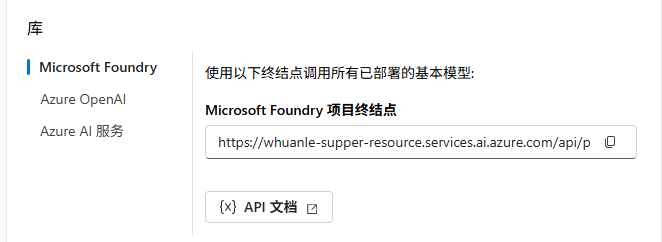
Azure OpenAI 是国内企业最常用的接入方式(合规、稳定、支持托管 GPT-4o / GPT-5 系列),它使用 AzureOpenAIClient 构造客户端,认证推荐用 DefaultAzureCredential,也支持 API Key。
需要安装的包:
Azure.AI.OpenAI
Azure.Identity
Microsoft.Agents.AI.OpenAI
最简接入:
using Azure;
using Azure.AI.OpenAI;
using Microsoft.Agents.AI;
using OpenAI.Chat;
using OpenAI.Responses;

AIAgent agent = new AzureOpenAIClient(
        new Uri("https://xxxx-resource.cognitiveservices.azure.com/"),
        new AzureKeyCredential(key: "1234"))
    .GetChatClient("gpt-5.4")
    .AsAIAgent(
        instructions: "你是一个讲笑话高手。",
        name: "Joker");


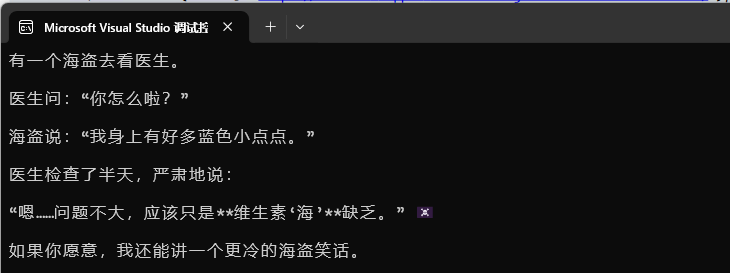
Console.WriteLine(await agent.RunAsync("讲一个关于海盗的笑话。"));
这里的调用链值得拆开看:
new AzureOpenAIClient(...)构造 Azure OpenAI 顶层客户端,传入资源 endpoint 和凭据。.GetChatClient(deploymentName)拿到 OpenAI SDK 的ChatClient(注意是 部署名,不是模型名)。.AsAIAgent(...)是 MAF 提供的扩展方法,内部调用ChatClient.AsIChatClient()转成IChatClient,再包成ChatClientAgent。
如果用 API Key 而非 Azure 凭据,把 DefaultAzureCredential() 换成 new ApiKeyCredential(apiKey) 即可。
部署名 vs 模型名:Azure OpenAI 里你创建的是一个「部署(deployment)」,部署时指定底层模型。所以代码里传的是部署名(如
gpt-4o-mini、my-gpt5-deploy),不是直接的模型 ID。这是新手最容易踩的点。
Azure AI Foundry(原 Azure AI Studio)是微软的模型聚合平台,可以在一处托管 OpenAI、Anthropic、DeepSeek、Meta、xAI 等各厂模型。Foundry 有两种 Agent 模式:
- Responses Agent:代码优先,无需预先创建服务端资源,直接用模型名调用,返回的就是
ChatClientAgent。推荐入门用这种。 - Foundry Agent:版本化、服务端托管的 Agent,返回
FoundryAgent,适合需要服务端管理配置的场景。
需要安装的包:
Azure.Identity
Microsoft.Agents.AI.Foundry --prerelease
Responses Agent 接入(推荐):
using Azure.AI.Projects;
using Azure.Identity;
using Microsoft.Agents.AI;

var endpoint = Environment.GetEnvironmentVariable("AZURE_FOUNDRY_PROJECT_ENDPOINT")
    ?? throw new InvalidOperationException("endpoint is not set.");

AIAgent agent = new AIProjectClient(
        new Uri(endpoint),
        new DefaultAzureCredential())
    .AsAIAgent(
        model: "gpt-4o-mini",
        name: "Joker",
        instructions: "你是一个讲笑话高手。");

Console.WriteLine(await agent.RunAsync("讲一个关于海盗的笑话。"));
这里用的是 AIProjectClient,它来自 Azure.AI.Projects,是 Foundry 的统一入口。.AsAIAgent(model: ..., ...) 这个重载走的是 Responses 模式,内部把 Foundry 的响应客户端包成 FoundryChatClient(一个 IChatClient),再构造 ChatClientAgent。
连接 GitHub Models
Github Models 开放了 OpenAI 接口协议,endpoint 指向 https://models.inference.ai.azure.com,GitHub Models 是一个很有性价比的选择,能免费试用 OpenAI、Meta、Mistral 等几十种模型。
Microsoft.Agents.AI.OpenAI
using System.ClientModel;
using Microsoft.Agents.AI;
using OpenAI;

var gitHubToken = Environment.GetEnvironmentVariable("GITHUB_TOKEN")
    ?? throw new InvalidOperationException("GITHUB_TOKEN is not set.");

var options = new OpenAIClientOptions
{
    Endpoint = new Uri("https://models.inference.ai.azure.com")
};

OpenAIClient client = new OpenAIClient(new ApiKeyCredential(gitHubToken), options);

AIAgent agent = client
    .GetChatClient("gpt-4o-mini")    // 也可以是 Phi-3.5-mini-instruct 等
    .AsAIAgent(
        instructions: "你是一个讲笑话高手。",
        name: "Joker");

Console.WriteLine(await agent.RunAsync("讲一个关于海盗的笑话。"));
连接 Anthropic
Anthropic 的 Claude 系列在长文本和推理上表现很强,Claude Code 使用人数最广泛,国产模型也都支持 Anthropic 接口,所以这里介绍一下怎么接入。
MAF 提供了专门的 Microsoft.Agents.AI.Anthropic 桥接包,并支持三种部署方式:直连 Anthropic 公网 API、在 Azure Foundry 上用 API Key 托管、在 Foundry 上用 Azure Token 凭据。
需要安装的包:
Microsoft.Agents.AI.Anthropic
直连 Anthropic 公网 API(最简单):
using Anthropic;
using Microsoft.Agents.AI;

var deploymentName = "qwen/qwen3.5-9b";

AnthropicClient client = new() { BaseUrl = "http://127.0.0.1:1234", ApiKey = "1234" };

AIAgent agent = client.AsAIAgent(
    model: deploymentName,
    name: "Joker",
    instructions: "你是一个讲笑话高手。");

Console.WriteLine(await agent.RunAsync("讲一个关于海盗的笑话。"));
实际请求:
{
  "max_tokens": 4096,
  "messages": [
    {
      "role": "user",
      "content": [
        {
          "type": "text",
          "text": "讲一个关于海盗的笑话。"
        }
      ]
    }
  ],
  "model": "qwen/qwen3.5-9b",
  "system": [
    {
      "type": "text",
      "text": "你是一个讲笑话高手。"
    }
  ]
}
连接 Google Gemini
Gemini 通过 Google.GenAI SDK 接入,它原生提供 AsIChatClient(model) 方法。同样不需要专门的 MAF 桥接包,用通用 AsAIAgent 即可。
Google.GenAI
using Google.GenAI;
using Microsoft.Agents.AI;

var apiKey = Environment.GetEnvironmentVariable("GEMINI_API_KEY")!;
var model = "gemini-2.0-flash";

// 方式一:用扩展方法
AIAgent agent = new Client(vertexAI: false, apiKey: apiKey)
    .AsIChatClient(model)
    .AsAIAgent(
        instructions: "你是一个讲笑话高手。",
        name: "Joker");

// 方式二:直接 new ChatClientAgent(等价)
ChatClientAgent agentDirect = new(
    new Client(vertexAI: false, apiKey: apiKey).AsIChatClient(model),
    name: "Joker",
    instructions: "你是一个讲笑话高手。");