
ChatClientAgent 管道与中间件
Microsoft Agent Framework 框架的设计是管道模式,类似 ASP.NET Core,通过管道设计,可以抽象简化很多功能模式,以抽象中间件的形式注入到管道中,为 AI 提供功能。
本章对于理解 Microsoft Agent Framework 的工作模式非常重要,本章将会通过介绍各类中间件和上下文传递模式,讲解 MAF 框架的管道和内部工作原理。
一次性理解三个中间件
前几章笔者介绍了,把一个 C# 方法注册成工具,模型就会在需要时自动调用它、自动拿结果、自动再生成。这个多轮对话自动循环背后藏着一个东西,管道(pipeline)。
这一章就把这根管道彻底剖开。
本章主要回答两个问题:
-
一是自动多轮到底在哪一层发生的;
-
二是它是后续所有能力的挂载点,日志、脱敏、护栏、人工审批、RAG 召回、记忆、追踪,全都靠往这根管道上挂中间件实现。搞懂管道,你才知道每种能力该挂在哪一层。
MAF 的管道本质是装饰器(decorator),你写一个委托(或一个继承
DelegatingAIAgent/DelegatingChatClient的类),框架在调用真正的 agent / 模型之前,先把它包一层。。
Microsoft Agent Framework 中间件有三种类型,每种类型都有流式和非流式两种处理方法,这三种中间件在起作用的时机不一样。
注册一个中间件:
.Use(
    runFunc: SecurityMiddleware,            // 拦截 RunAsync
    runStreamingFunc: SecurityStreamingMiddleware)  // 拦截 RunStreamingAsync
也可以只注册一个:
.Use(runFunc: LogMiddleware, runStreamingFunc: null)
三种中间件:
| # | 名称 | 拦截粒度 | 挂载入口 |
|---|---|---|---|
| 1 | Agent 运行中间件 (agent run middleware) | 整轮 RunAsync | AIAgentBuilder.Use(runFunc, runStreamingFunc) |
| 2 | 函数调用中间件 (function invocation middleware) | 单次工具执行 | AIAgentBuilder.Use(callback) |
| 3 | IChatClient 中间件 (chat-level middleware) | 单次模型调用 | ChatClientBuilder.Use(getResponseFunc, ...) |
这三种的共同点:都是拦截式的,你拿到一个 next(或 inner),在调用它之前/之后做事,可以选择短路、重试、改数据。这正是中间件这个词的含义。
这三种中间件的区别在于,它们和 “层级” 的关系不一样,也就是生命周期不一样。它们分别挂在两个层级上:
Agent 层(用 AIAgentBuilder.Use)
   ├─ ① Agent 运行中间件
   └─ ② 函数调用中间件        ← 虽挂 Agent 层入口,但触发在 Chat 层的工具循环里

Chat 层(用 ChatClientBuilder.Use)
   └─ ③ Chat 中间件
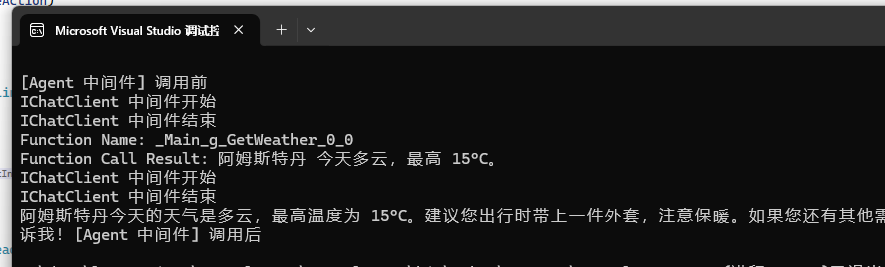
在之前的案例中,只有一个函数被 AI 模型调用时:
[Description("获取指定地点的天气。")]
static string GetWeather([Description("地点名称")] string location) => ...;
| 中间件 | 跑几次 | 为什么 |
|---|---|---|
| ① Agent 运行中间件 | 1 次 | 它包住整轮,里面循环几次它不管 |
| ③ IChatClient 中间件 | 2 次 | 模型被打 2 次,它每次都经过 |
| ② 函数调用中间件 | 1 次 | 只在真正执行 GetWeather 时触发 |
如图所示,作用范围分别是:
Agent 中间件 > 函数调用中间件 > Chat 中间件
但是不能单一认为 Chat 被触发次数最多,可能因为多轮对话中要调用很多函数工具,那么有可能函数中间件被调用次数最多。
笔者主要意思是关注中间件管道的流通顺序和层次,并不是很关注调用次数。
以上个章节为例,问 阿姆斯特丹天气怎么样? 时,一共出现两轮对话:
- Agent 把问题发送给 AI 模型 -> AI 模型要求调用
GetWeather() - Agent 调用
GetWeather把结果发送给 AI 模型 ->AI 模型回复
Chat 中间件是只要发送对话就会触发,所以触发了两次。
使用中间件时,需要注意一个问题,官方文档的案例是基于 Microsoft.Extensions.AI.ChatClientBuilder 创建的,而 AIAgent 类型是基于 Microsoft.Agents.AI.AIAgentBuilder,所以在定义和使用方法上完全不一样。
特别要注意,它们分别属于两个不同的 nuget 包。
| 中间件 | 在哪定义 | 怎么传 | 参数特征 |
|---|---|---|---|
| ① Agent 运行中间件 | AIAgentBuilder.Use | runFunc / runStreamingFunc | 委托里有 AIAgent,返回 AgentResponse |
| ② 函数调用中间件 | AIAgentBuilder.Use | callback(位置参数) | 委托里有 FunctionInvocationContext,返回 ValueTask<object?> |
| ③ Chat 中间件 | ChatClientBuilder.Use | getResponseFunc / getStreamingResponseFunc | 委托里有 IChatClient,返回 ChatResponse |
.AsBuilder()
.Use(runFunc: SomeMiddleware, runStreamingFunc: null)   // → ① Agent 中间件
.Use(FunctionCallbackMiddleware)                          // → ② 函数中间件(参数是个 4 参数委托)
.Use((inner, _) => new MyCustomAgent(inner))              // → 自定义装饰器(参数是工厂)
.Build();
如果我们要定义一个 Agent 运行中间件,以便拦截 Agent,可以这样分别写非流式和流式对话的拦截:
async Task<AgentResponse> MyAgentMiddleware(
    IEnumerable<Microsoft.Extensions.AI.ChatMessage> messages,
    AgentSession? session,
    AgentRunOptions? options,
    AIAgent innerAgent,                                    // ★ 内层是 AIAgent
    CancellationToken ct)
{
    Console.WriteLine("[Agent 中间件] 调用前");
    var response = await innerAgent.RunAsync(messages, session, options, ct);
    Console.WriteLine("[Agent 中间件] 调用后");
    return response;
}

async IAsyncEnumerable<AgentResponseUpdate> )CustomAgentRunStreamingMiddleware(
    IEnumerable<Microsoft.Extensions.AI.ChatMessage> messages,
    AgentSession? session,
    AgentRunOptions? options,
    AIAgent innerAgent,                                    // ★ 内层是 AIAgent
    CancellationToken ct)
{
    Console.WriteLine("[Agent 中间件] 调用前");
    await foreach (var u in innerAgent.RunStreamingAsync(messages, session, options, ct))
        yield return u;
    Console.WriteLine("[Agent 中间件] 调用后");
}
实现一个函数调用中间件定义:
async ValueTask<object?> CustomFunctionCallingMiddleware(
    AIAgent agent,
    FunctionInvocationContext context,
    Func<FunctionInvocationContext, CancellationToken, ValueTask<object?>> next,
    CancellationToken cancellationToken)
{
    Console.WriteLine($"Function Name: {context!.Function.Name}");
    var result = await next(context, cancellationToken);
    Console.WriteLine($"Function Call Result: {result}");

    return result;
}
使用 Agent 中间件和函数中间件:
[Description("获取指定地点的天气。")]
static string GetWeather([Description("地点名称")] string location)
    => $"{location} 今天多云,最高 15°C。";

AIAgent agent = new OpenAIClient(
        credential: new ApiKeyCredential(key: "1234"),
        options: new OpenAIClientOptions { Endpoint = new Uri("http://127.0.0.1:1234/v1") })
    .GetChatClient(model: "qwen/qwen3.5-9b")
    .AsAIAgent(
        instructions: "你是一个乐于助人的助手,必要时调用工具。",
        name: "Helper",
        tools: [AIFunctionFactory.Create(GetWeather)]).AsBuilder()
    .Use(runFunc: MyAgentMiddleware, runStreamingFunc: CustomAgentRunStreamingMiddleware)	// Agent 中间件
    .Use(callback: CustomFunctionCallingMiddleware)											// 函数调用中间件
    .Build();


// 第 2 轮:触发工具调用(模型会自动调 GetWeather),模型仍记得第 1 轮
Console.WriteLine();
await foreach (var u in agent.RunStreamingAsync("阿姆斯特丹天气怎么样?"))
    Console.Write(u);
IChatClient 中间件则需要在 ChatClientBuilder 中定义。
async Task<ChatResponse> CustomChatClientMiddleware(
    IEnumerable<Microsoft.Extensions.AI.ChatMessage> messages,
    ChatOptions? options,
    IChatClient innerChatClient,
    CancellationToken cancellationToken)
{
    Console.WriteLine("IChatClient 中间件开始");
    var response = await innerChatClient.GetResponseAsync(messages, options, cancellationToken);
    Console.WriteLine("IChatClient 中间件结束");

    return response;
}
注入 IChatClient 中间件:
AIAgent agent = new OpenAIClient(
        credential: new ApiKeyCredential(key: "1234"),
        options: new OpenAIClientOptions { Endpoint = new Uri("http://127.0.0.1:1234/v1") })
    .GetChatClient(model: "qwen/qwen3.5-9b")
    .AsAIAgent(
        instructions: "你是一个乐于助人的助手,必要时调用工具。",
        name: "Helper",
        tools: [AIFunctionFactory.Create(GetWeather)],
        clientFactory: (chatClient) => chatClient		// 只能通过 clientFactory 构造注册 IChatClient 中间件
                .AsBuilder()
                    .Use(getResponseFunc: CustomChatClientMiddleware, getStreamingResponseFunc: null)
                .Build())
    .AsBuilder()
    .Use(runFunc: MyAgentMiddleware, runStreamingFunc: CustomAgentRunStreamingMiddleware)
    .Use(callback: CustomFunctionCallingMiddleware)
    .Build();
Agent 层中间件
Agent 层中间件用 AIAgentBuilder.Use(...) 挂载,可以注册多个 agent 中间件,会按顺序执行。
.AsBuilder()
.Use(Outer, runStreamingFunc: null)   // 最外层:第一个看到请求
.Use(Inner, runStreamingFunc: null)   // 靠内:第二个看到请求
.Build();

// 运行顺序:Outer 前 → Inner 前 → 真实 agent → Inner 后 → Outer 后
它包住整轮 RunAsync / RunStreamingAsync,能拿到完整的请求消息和完整的响应。
// 非流式委托
Func<
    IEnumerable<ChatMessage>,    // 本轮的输入消息
    AgentSession?,               // 会话(可能为 null)
    AgentRunOptions?,            // 运行选项(可能为 null)
    AIAgent,                     // 内层 agent,你必须调用它
    CancellationToken,
    Task<AgentResponse>>         // 返回响应

// 流式委托
Func<
    IEnumerable<ChatMessage>,
    AgentSession?,
    AgentRunOptions?,
    AIAgent,
    CancellationToken,
    IAsyncEnumerable<AgentResponseUpdate>>
第 4 个参数 AIAgent innerAgent 是关键,它是被你包住的下一层。
必须在委托里调用 innerAgent.RunAsync(...),请求才会继续往下传,否则管道就断在你这一层了。这和 ASP.NET Core 中间件必须调 next() 的设计差不多。
代码示例:
// 使用中间件
.Use(
     runFunc: MyAgentMiddleware,
     runStreamingFunc: MyStreamingMiddleware)
    .Build();


async Task<AgentResponse> MyAgentMiddleware(
    IEnumerable<ChatMessage> messages,
    AgentSession? session,
    AgentRunOptions? options,
    AIAgent innerAgent,
    CancellationToken cancellationToken)
{
    // 必须在这里手动调用 .RunAsync()
    var response = await innerAgent.RunAsync(messages, session, options, cancellationToken);
    return response;
}

async IAsyncEnumerable<AgentResponseUpdate> MyStreamingMiddleware(
    IEnumerable<ChatMessage> messages,
    AgentSession? session,
    AgentRunOptions? options,
    AIAgent innerAgent,
    [System.Runtime.CompilerServices.EnumeratorCancellation] CancellationToken cancellationToken)
{
    // 必须在这里手动调用 .RunStreamingAsync()
    await foreach (var update in innerAgent.RunStreamingAsync(messages, session, options, cancellationToken))
    {
        yield return update;   // 原样转发,也可以在这里改 update
    }
}
还有一个额外的重载 Use(sharedFunc:...),它允许为非流和流提供相同的中间件,而不会阻塞流。但是共享中间件这种工作模式,无法拦截或覆盖输出,也就是不能读取流动中的信息,也不能替换、修改管道中的内容,一般来说,打印日志和做链路追踪或者记录耗时可能会用到。
.AsBuilder()
.Use(async (messages, session, options, next, ct) =>
{
    Console.WriteLine("调用前");
    await next(messages, session, options, ct);   // ← 调用内层,不接收返回值,不能读取信息,也没法修改管道数据
    Console.WriteLine("调用后");
})
.Build();
如果中间件逻辑复杂、要带状态或依赖,写成类更清晰。继承 DelegatingAIAgent,重写 RunCoreAsync / RunCoreStreamingAsync:
using Microsoft.Agents.AI;

sealed class LoggingAgent(AIAgent inner) : DelegatingAIAgent(inner)
{
    protected override async Task<AgentResponse> RunCoreAsync(
        IEnumerable<ChatMessage> messages,
        AgentSession? session = null,
        AgentRunOptions? options = null,
        CancellationToken cancellationToken = default)
    {
        Console.WriteLine($"[日志] 开始,{messages.Count()} 条消息");
        var resp = await InnerAgent.RunAsync(messages, session, options, cancellationToken);
        Console.WriteLine($"[日志] 结束,回复 {resp.Text.Length} 字");
        return resp;
    }
}

// 挂载:用接收工厂的重载
var agent = baseAgent
    .AsBuilder()
    .Use((inner, _) => new LoggingAgent(inner))
    .Build();
Agent 层中间件最经典的场景,进来的消息先脱敏、出去的响应也脱敏,模型永远看不到真实手机号:
async Task<AgentResponse> PiiFilter(
    IEnumerable<ChatMessage> messages, AgentSession? session,
    AgentRunOptions? options, AIAgent innerAgent, CancellationToken ct)
{
    // ── 前置:把用户消息里的手机号抹掉 ──
    var cleaned = messages
        .Select(m => new ChatMessage(m.Role, RedactPii(m.Text)))
        .ToList();

    // ── 调用内层:用脱敏后的消息跑真实对话 ──
    var response = await innerAgent.RunAsync(cleaned, session, options, ct);

    // ── 后置:把模型回复也脱敏(万一它复述了) ──
    response.Messages = response.Messages
        .Select(m => new ChatMessage(m.Role, RedactPii(m.Text)))
        .ToList();

    return response;
}

// 检查是否有敏感信息
static string RedactPii(string text) =>
    System.Text.RegularExpressions.Regex.Replace(text, @"\b\d{3}-\d{3}-\d{4}\b", "[已脱敏]");
由于 Agent 中间件可以注册多个,所以我们也可以实现不同的中间件,按需注入,实现一个灵活、动态能力的 Agent。
函数调用中间件
函数调用中间件目前仅支持使用 FunctionInvokingChatClient 的 AIAgent,例如 ChatClientAgent。
这是粒度最细的一类。模型决定调用你注册的某个 C# 工具函数时,执行那个函数的前后会触发它。它用 AIAgentBuilder.Use(...) 的一个专门重载挂载(和 Agent 运行中间件同名,但参数类型不同):
// 函数调用中间件委托签名
Func<
    AIAgent,                                              // 当前 agent
    FunctionInvocationContext,                            // 本次调用的上下文(函数名、参数等)
    Func<FunctionInvocationContext, CancellationToken, ValueTask<object?>>,  // ★ 调用下一层的 next
    CancellationToken,
    ValueTask<object?>>                                   // 返回工具的结果
典型用途:工具日志、改写工具返回值、人工审批、缓存等。
[Description("获取指定地点的天气。")]
static string GetWeather([Description("地点名称")] string location)
    => $"{location} 今天多云,最高 15°C。";

AIAgent agent = new OpenAIClient(
        credential: new ApiKeyCredential(key: "1234"),
        options: new OpenAIClientOptions { Endpoint = new Uri("http://127.0.0.1:1234/v1") })
    .GetChatClient(model: "qwen/qwen3.5-9b")
    .AsAIAgent(
        instructions: "你是一个乐于助人的助手。",
        name: "Demo",
        tools: [AIFunctionFactory.Create(GetWeather)])
    .AsBuilder()
    .Use(LoggingFunctionMiddleware)
    .Build();

// 函数调用中间件:包住「执行工具」
async ValueTask<object?> LoggingFunctionMiddleware(
    AIAgent agent,
    FunctionInvocationContext context,
    Func<FunctionInvocationContext, CancellationToken, ValueTask<object?>> next,
    CancellationToken cancellationToken)
{
    Console.WriteLine($"  [工具] 执行 {context.Function.Name} 之前");
    var result = await next(context, cancellationToken);   // ← 真正执行你的 GetWeather
    Console.WriteLine($"  [工具] 执行 {context.Function.Name} 之后,结果:{result}");
    return result;
}
限制:函数调用中间件依赖内层 agent 暴露
FunctionInvokingChatClient,所以它只对ChatClientAgent及其派生类有效。拿一个完全自定义的AIAgent去挂会抛异常。人工审批的完整玩法(拒绝调用、改参数)留到 函数调用和工具 一章展开。
Chat 层中间件
每次调用模型时,都会触发改中间件。
聊天级中间件允许拦截和修改对底层聊天客户端实现的调用,这对于日志记录、在提示符到达 AI 服务之前进行修改或转换响应都很有用。
它用 ChatClientBuilder.Use(...) 挂,这个方法来自底层包 Microsoft.Extensions.AI。它操作的是 ChatMessage / ChatResponse,比 Agent 层更底层。
Chat 层中间件的两个委托签名(注意第 3 个参数是 IChatClient innerChatClient):
// 非流式
Func<IEnumerable<ChatMessage>, ChatOptions?, IChatClient, CancellationToken,
     Task<ChatResponse>>? getResponseFunc

// 流式
Func<IEnumerable<ChatMessage>, ChatOptions?, IChatClient, CancellationToken,
     IAsyncEnumerable<ChatResponseUpdate>>? getStreamingResponseFunc
挂载方式:在构造 agent 时通过 clientFactory 参数接入。
AIAgent agent = new OpenAIClient(
        credential: new ApiKeyCredential(key: "1234"),
        options: new OpenAIClientOptions { Endpoint = new Uri("http://127.0.0.1:1234/v1") })
    .GetChatClient(model: "qwen/qwen3.5-9b")
    .AsAIAgent(
        instructions: "你是一个乐于助人的助手。",
        name: "Demo",
        clientFactory: chatClient => chatClient
            .AsBuilder()
            .Use(
                getResponseFunc: MyChatMiddleware,
                getStreamingResponseFunc: MyStreamingChatMiddleware)
            .Build());

// ── Chat 层中间件:签名必须和 getResponseFunc 一致 ──
async Task<ChatResponse> MyChatMiddleware(
    IEnumerable<ChatMessage> messages,
    ChatOptions? chatOptions,
    IChatClient innerChatClient,
    CancellationToken cancellationToken)
{
    Console.WriteLine("  [Chat] 发请求给模型之前");
    var response = await innerChatClient.GetResponseAsync(messages, chatOptions, cancellationToken);
    Console.WriteLine("  [Chat] 收到模型响应之后");
    return response;
}

// ── 流式版本 ──
async IAsyncEnumerable<ChatResponseUpdate> MyStreamingChatMiddleware(
    IEnumerable<ChatMessage> messages,
    ChatOptions? chatOptions,
    IChatClient innerChatClient,
    [System.Runtime.CompilerServices.EnumeratorCancellation] CancellationToken cancellationToken)
{
    Console.WriteLine("  [Chat 流式] 发请求之前");
    await foreach (var update in innerChatClient.GetStreamingResponseAsync(messages, chatOptions, cancellationToken))
    {
        yield return update;
    }
    Console.WriteLine("  [Chat 流式] 收完之后");
}
和 Agent 层一样,innerChatClient.GetResponseAsync(...) 必须调,否则请求断在这一层。
中间件不一定要在构造时定死。通过 ChatClientAgentRunOptions.ChatClientFactory,可以只对这一次 Run 套一层 Chat 中间件,这就是官方说的 Run 作用域:不同请求走不同中间件链,agent 本身不用重建。
var runOptions = new ChatClientAgentRunOptions
{
    ChatClientFactory = chatClient => chatClient
        .AsBuilder()
        .Use(getResponseFunc: PerRequestMiddleware, getStreamingResponseFunc: null)
        .Build()
};

await agent.RunAsync("...", session, runOptions);   // 只这一轮带这个中间件
对比一下两种作用域:
- Agent 作用域:构造时通过
AsBuilder().Use(...)或clientFactory挂载,对这个 agent 的所有模型调用生效。 - Run 作用域:通过
ChatClientAgentRunOptions.ChatClientFactory挂载,只对某一次RunAsync生效。
三种上下文传递方式
写中间件时很快会遇到一个问题:不同中间件之间、或中间件与工具之间怎么传数据? 比如 Agent 层中间件算好了当前用户是 VIP,函数调用中间件想据此调整工具行为;或者第 1 轮记下了用户偏好,第 5 轮的工具还想读它。
官方按作用范围(scope)从小到大归纳成三种方式,正好对应三类中间件能拿到的上下文对象:
| 方式 | 作用范围 | 在哪存/取 | 存活时长 |
|---|---|---|---|
① FunctionInvocationContext | 单次工具调用 | 函数调用中间件的 context 参数 | 一次函数调用 |
② AgentRunOptions.AdditionalProperties | 单次 RunAsync | 运行中间件的 options 参数 | 一次 Run |
③ AgentSession.StateBag | 整个会话 | session.StateBag | 跨多轮,会被序列化 |
下面分别讲讲解。
FunctionInvocationContext
这是最小的作用域。函数调用中间件的委托里有个 FunctionInvocationContext context 参数,它代表模型这一次决定调用某个工具的上下文,里面的 Arguments 就是传给工具的参数。
FunctionInvocationContext 是由框架生成的,我们只能使用,不能构建此对象。
它来自底层包 Microsoft.Extensions.AI(不在 MAF 里)。Arguments 是个字典,支持索引器读写和 TryGetValue:
// 函数调用中间件:context 是第二个参数
async ValueTask<object?> MyFunctionMiddleware(
    AIAgent agent,
    FunctionInvocationContext context,                       // ← 上下文在这
    Func<FunctionInvocationContext, CancellationToken, ValueTask<object?>> next,
    CancellationToken cancellationToken)
{
    // 读参数(模型传给工具的)
    if (context.Arguments.TryGetValue("location", out object? loc))
        Console.WriteLine($"模型要查 {loc}");

    // 也能写参数:改写后再调 next,工具拿到的就是改过的参数
    context.Arguments["location"] = "阿姆斯特丹";            // 强制改成阿姆斯特丹

    var result = await next(context, cancellationToken);     // 用(可能改过的)参数执行工具
    Console.WriteLine($"工具返回:{result}");
    return result;
}
特点:
- 范围最小:只在这一次工具调用里有效。同一个工具被模型调两次,两次的
context是各自独立的。 - 不用找上下文:它是函数调用中间件的直接参数,不用通过
CurrentRunContext反查。 - 既能读也能改:读
Arguments看模型传了啥、改Arguments影响工具实际收到的参数、改context.Result覆盖工具返回值。
典型场景:工具日志、改写工具参数、覆盖工具返回值、单个工具的人工审批。审批就发生在调
next之前,不调next、直接返回拒绝信息,工具就不会真的执行。
AgentRunOptions.AdditionalProperties
在 AgentRunOptions 中定义,数据绑在某一次 RunAsync 调用上,整条管道(从 Agent 层中间件到 Chat 层中间件到工具)这一次 Run 里都能读到,但下一次 Run 就没了,需要每次 Run 的时候都传递。
AgentRunOptions 有个 AdditionalProperties 属性(类型 AdditionalPropertiesDictionary?,来自 Microsoft.Extensions.AI)。你可以在发起 Run 前往里塞数据,中间件再读出来:
using Microsoft.Extensions.AI;

// ── 调用方:发起 Run 前,往 options 里塞数据 ──
var runOptions = new AgentRunOptions
{
    AdditionalProperties = new AdditionalPropertiesDictionary()
};
// 用泛型扩展方法存(key 自动取 typeof(T).FullName,一个类型一个槽)
runOptions.AdditionalProperties!.Add(new UserContext(Tier: "VIP", Lang: "zh"));

// 发起这次 Run
await agent.RunAsync("帮我查天气", session, runOptions);

record UserContext(string Tier, string Lang);


// ── 中间件里:从 options 读出来 ──
async Task<AgentResponse> TierAwareMiddleware(
    IEnumerable<ChatMessage> messages, AgentSession? session,
    AgentRunOptions? options, AIAgent inner, CancellationToken ct)
{
    // ★ 从 options.AdditionalProperties 反查调用方塞的数据
    if (options?.AdditionalProperties?.TryGetValue<UserContext>(out var userCtx) is true
        && userCtx.Tier == "VIP")
    {
        Console.WriteLine("VIP 用户,走优先通道");
    }

    return await inner.RunAsync(messages, session, options, ct);
}
MAF 给 AdditionalPropertiesDictionary 提供了一组泛型扩展方法(源码 AdditionalPropertiesExtensions.cs),key 内部取 typeof(T).FullName,所以每个类型一个槽,不用自己起 key 名:
| 扩展方法 | 作用 |
|---|---|
Add<T>(T value) | 存一个 T 类型的值 |
TryGetValue<T>(out T? value) | 取 T 类型的值 |
Contains<T>() / TryAdd<T>(T) / Remove<T>() | 判断/尝试存/删除 |
特点:
- 作用域是单次 Run:这次
RunAsync结束,数据就没了。多轮对话里下一轮是新的AgentRunOptions(除非你自己复用)。 - 整条管道可读:Agent 层中间件从参数
options读;Chat 层/函数中间件没有options参数,可以通过AIAgent.CurrentRunContext?.RunOptions?.AdditionalProperties反查。 - 不会被序列化:和 StateBag 不同,它不随 session 持久化,进程重启就没了。
也可以用原始的字符串 key(
options.AdditionalProperties["myKey"] = value),适合不想为每个数据定义类型的场景。
AgentSession.StateBag
数据绑在会话上,跨多次 RunAsync 都在,第 1 轮存的第 N 轮还能读,甚至会话序列化恢复后还在。
后面的章节还会详细重新介绍 AgentSession: 历史对话和上下文 。
session.StateBag 是个线程安全的字典(类型 AgentSessionStateBag,背后 ConcurrentDictionary)。
Agent 层中间件的 session 参数直接就能用:
// ── 第 1 轮:把用户待办存进会话 ──
async Task<AgentResponse> LoadTodoMiddleware(
    IEnumerable<ChatMessage> messages, AgentSession? session,
    AgentRunOptions? options, AIAgent inner, CancellationToken ct)
{
    if (session is not null)
    {
        var todos = await FetchTodosFromDb();
        session.StateBag.SetValue("TodoList", todos);     // 存(会跟着会话活下去)
    }

    return await inner.RunAsync(messages, session, options, ct);
}


// ── 第 N 轮:工具或别的中间件读出来 ──
// 比如一个 AIContextProvider 注入待办给模型
sealed class TodoProvider : MessageAIContextProvider
{
    protected override ValueTask<IEnumerable<ChatMessage>> ProvideMessagesAsync(
        InvokingContext context, CancellationToken ct = default)
    {
        var todos = context.Session?.StateBag.GetValue<List<string>>("TodoList");
        string hint = todos is null ? "无待办" : $"你有 {todos.Count} 项待办";
        return new ValueTask<IEnumerable<ChatMessage>>(
            [new ChatMessage(ChatRole.User, hint)]);
    }
}
StateBag 的关键 API(源码 AgentSessionStateBag.cs,值必须是引用类型,有 where T : class 约束):
| 方法 | 签名 | 说明 |
|---|---|---|
SetValue<T> | void SetValue<T>(string key, T? value) where T : class | 存值 |
GetValue<T> | T? GetValue<T>(string key) where T : class | 取值,取不到返回 null |
TryGetValue<T> | bool TryGetValue<T>(string key, out T? value) where T : class | 安全取值 |
TryRemoveValue | bool TryRemoveValue(string key) | 删除 |
特点:
- 跨多轮:生命周期跟 session 一样长,整个会话都在。
- 会被序列化:随
SerializeSessionAsync存成 JSON,会话恢复后还在。⚠️ 所以别存密钥/敏感数据(源码注释明确警告:可能被持久化到外部存储)。 - 线程安全:
ConcurrentDictionary实现,并发读写没问题(但存的「对象本身」的线程安全要自己保证)。 - Chat 层/函数中间件也能访问:没有
session参数时,通过AIAgent.CurrentRunContext?.Session?.StateBag反查。
短路终止(Guardrails)
用来做护栏:检测到违规内容,直接拒绝,不浪费一次模型调用。
原理很简单,就是拦截后直接返回,而不进入 next。
async Task<AgentResponse> GuardrailMiddleware(
    IEnumerable<ChatMessage> messages, AgentSession? session,
    AgentRunOptions? options, AIAgent innerAgent, CancellationToken ct)
{
    string input = string.Concat(messages.Select(m => m.Text));

    // 命中违规词 → 直接短路,不调内层,不花钱调模型
    if (input.Contains("有害内容", StringComparison.OrdinalIgnoreCase))
    {
        return new AgentResponse(
            new ChatMessage(ChatRole.Assistant, "抱歉,这个问题我无法回答。"));
    }

    // 正常放行
    return await innerAgent.RunAsync(messages, session, options, ct);
}
异常处理
中间件天然适合包 try/catch:重试、降级、记录错误、给用户友好的兜底回复,都在这里做。
async Task<AgentResponse> RetryMiddleware(
    IEnumerable<ChatMessage> messages, AgentSession? session,
    AgentRunOptions? options, AIAgent innerAgent, CancellationToken ct)
{
    const int maxRetries = 3;
    for (int attempt = 1; attempt <= maxRetries; attempt++)
    {
        try
        {
            return await innerAgent.RunAsync(messages, session, options, ct);
        }
        catch (HttpRequestException) when (attempt < maxRetries)
        {
            Console.WriteLine($"调用失败,第 {attempt} 次重试...");
            await Task.Delay(500 * attempt, ct);
        }
    }
    // 重试耗尽,给个兜底回复(而不是把异常抛给用户)
    return new AgentResponse(
        new ChatMessage(ChatRole.Assistant, "服务暂时不可用,请稍后再试。"));
}
注意:如果你想捕获的是模型返回了错误状态而不是抛了异常,要在 Chat 层中间件里看
ChatResponse.FinishReason(比如ContentFilter表示被审核拦截),那是不同的信号。
跨中间件共享状态
多个中间件之间要传数据(比如最外层记一个开始时间、最内层算耗时),用 .NET 自带的 AsyncLocal<T>。它在同一个异步调用链里贯通,不会串到并发的其他请求。
// 用 AsyncLocal 在同一轮调用里传值
static readonly AsyncLocal<bool> _skipGuardrail = new();

// 中间件 A:根据某条件设置标记
async Task<AgentResponse> SetFlagMiddleware(
    IEnumerable<ChatMessage> msg, AgentSession? s, AgentRunOptions? o,
    AIAgent inner, CancellationToken ct)
{
    _skipGuardrail.Value = IsAdminRequest(msg);   // 管理员请求豁免
    return await inner.RunAsync(msg, s, o, ct);
}

// 中间件 B(在 A 的内层):读取标记
async Task<AgentResponse> GuardrailMiddleware(
    IEnumerable<ChatMessage> msg, AgentSession? s, AgentRunOptions? o,
    AIAgent inner, CancellationToken ct)
{
    if (_skipGuardrail.Value)                      // 读到 A 设的值
    {
        Console.WriteLine("管理员请求,跳过护栏");
        return await inner.RunAsync(msg, s, o, ct);
    }
    // ... 正常护栏逻辑
    return await inner.RunAsync(msg, s, o, ct);
}
另外,AgentSession.StateBag(会话级字典)适合存跨多轮对话的状态,比 AsyncLocal(只活一次 Run)生命周期更长。选择看你要一次调用内共享还是一个会话内共享。