
函数调用
模型并不能直接执行工具,模型只能回复要调用的函数和参数,然后由 SDK 里的函数执行引擎 去处理,引擎负责把对应的 .NET 方法跑起来、把结果塞回对话、再让模型接着想。
在前面的章节,已经介绍过函数调用,本章将会继续深入探索。
模型与引擎的契约:两段式调用
函数调用(function calling / tool calling)本质是一份两段式的契约:
- 第一段:模型决策。模型收到对话历史 + 一张工具清单,在回复时可以选择在消息里塞上若干个
FunctionCallContent(工具调用请求),每个里面带工具名和参数。模型不执行任何东西,它只是说 "我想调GetWeather,参数是{location: "Amsterdam"}" 。 - 第二段:引擎执行。执行引擎把这些
FunctionCallContent接住,找到对应的 .NET 方法,调用它,拿到返回值,再把结果包成FunctionResultContent作为一条新消息塞回历史。然后再调一次模型,让它看到工具结果、继续往下走。
注册自己的工具
在 MAF 里,工具就是一个 AITool,更确切地说是它的子类 AIFunction,一个被 .NET 方法包装出来的、带名字和参数 schema 的可调用对象。注册工具的关键就一句话:把一个 .NET 方法变成 AIFunction,再放进 ChatOptions.Tools。
MAF 框架的工具注册比较灵活,下面按从简到繁列出四种注册方式。
AIFunctionFactory.Create 注册工具
把一个静态方法(或委托)交给 AIFunctionFactory.Create,它就用反射读出方法签名,生成一个 AIFunction。模型能看懂这个工具,靠的是两样东西:
- 方法上的
[Description]:告诉模型这个工具是干什么的; - 每个参数上的
[Description]:告诉模型这个参数要填什么。
这两段文字会被翻译成 JSON Schema,随请求一起发给模型。写得越清楚,模型越会用对。函数和函数参数需要使用 [Description] 特性注解标明解释
using System.ComponentModel;
using Microsoft.Extensions.AI;

[Description("Get the weather for a given location.")]
static string GetWeather([Description("The location to get the weather for.")] string location)
    => $"The weather in {location} is cloudy with a high of 15°C.";

// tools 参数接收一个 IList<AITool>,AIFunctionFactory.Create 把上面的方法变成 AIFunction
AIAgent agent = chatClient.AsAIAgent(
    model: model,
    instructions: "You are a helpful assistant",
    tools: [AIFunctionFactory.Create(GetWeather)]);

Console.WriteLine(await agent.RunAsync("What is the weather like in Amsterdam?"));
几个要点:
tools:参数最终进入ChatOptions.Tools,每个AsAIAgent(...)重载都支持它;- 方法可以是静态方法、实例方法、局部函数或 lambda;返回值可以是同步的,也可以是
Task<T>/ValueTask<T>;
想给工具起一个和方法名不同的名字,或者控制 JSON 序列化,用带 AIFunctionFactoryOptions 的重载:
AIFunctionFactory.Create(GetWeather, new AIFunctionFactoryOptions {
 Name = "weather_lookup",
 SerializerOptions = AgentJsonUtilities.DefaultOptions,
});
有个要点要注意,以 OpenAI 的接口为例,函数参数的类型实际上只支持 json 的类型,string、number、integer、boolean、object、array、null,跟 C# 的类型会有一个反序列化转换,要按 json 格式处理,否则会报错。所以要避免在函数参数中使用复杂的类型或者使用默认 Json 反序列化不支持的类型。
最终会把 C# 的函数转换成类似这个的请求结构给模型:
"tools": [{
	"type": "function",
	"function": {
		"description": "Get the weather for a given location。",		// 函数注释
		"name": "_Main_g_GetWeather_0_0",
		"parameters": {
			"type": "object",
			"required": [
				"location"
			],
			"properties": {
				"location": {
					"description": "The location to get the weather for",		// 参数注释
					"type": "string"
				}
			},
			"additionalProperties": false
		}
	}
}],
"tool_choice": "auto"
在 OpenAI Chat 一章的 提交工具与调用 中讲解过其原理,这里不再赘述。
通过类型注入插件
真实项目里,工具往往要依赖别的服务(数据库、HTTP 客户端、缓存……)。这时把工具写成一个插件类,通过依赖注入拿到依赖,再用一个 AsAITools() 方法显式列出 "对外暴露哪几个方法"。
例如有个服务叫 AgentPlugin,它的构造函数需要容器注入服务。
你可以在 AgentPlugin 中定义一个 AsAITools(),或者使用扩展函数,统一将容器实例的函数转换为 AITool 即可。
// 1) 把依赖和插件都注册进 DI 容器
ServiceCollection services = new();
services.AddSingleton<WeatherProvider>();
services.AddSingleton<CurrentTimeProvider>();
services.AddSingleton<AgentPlugin>();
IServiceProvider serviceProvider = services.BuildServiceProvider();

// 2) 从容器拿出插件,调 AsAITools() 拿到工具清单
//    关键:把 serviceProvider 也传给 agent,工具执行时才能解析依赖
AIAgent agent = chatClient.AsAIAgent(
    model: deploymentName,
    instructions: "You are a helpful assistant.",
    tools: [.. serviceProvider.GetRequiredService<AgentPlugin>().AsAITools()],
    services: serviceProvider);

internal sealed class AgentPlugin(WeatherProvider weatherProvider)
{
    // 构造函数注入的依赖,直接用
    public string GetWeather(string location) => weatherProvider.GetWeather(location);

    // 方法签名里要 IServiceProvider,框架会在调用时自动塞进来
    public DateTimeOffset GetCurrentTime(IServiceProvider sp, string location)
        => sp.GetRequiredService<CurrentTimeProvider>().GetCurrentTime(location);

    // 一个类里可能有十几个方法,但只有这里 yield 出来的才会暴露给模型
    public IEnumerable<AITool> AsAITools()
    {
        yield return AIFunctionFactory.Create(this.GetWeather);
        yield return AIFunctionFactory.Create(this.GetCurrentTime);
    }
}
笔者比较建议通过反射自动识别,例如定义一个 [Plugin] 特性注解,标记在需要被注册为工具的函数上,然后通过一个扩展函数自动反射识别,然后做好缓存,这样比较灵活,而且性能也很好。
internal sealed class AgentPlugin(WeatherProvider weatherProvider)
{
    [Plugin]
    public string GetWeather(string location) => weatherProvider.GetWeather(location);

    [Plugin]
    public DateTimeOffset GetCurrentTime(IServiceProvider sp, string location)
        => sp.GetRequiredService<CurrentTimeProvider>().GetCurrentTime(location);
}
public static IEnumerable<AITool> GetTools<T>(T plugin)
{
    foreach (var item in typeof(T).GetMethods(...))
    {
        if(item.GetCustomAttribute<PluginAttrube>() is not null)
        {
            // 注册为工具
        }
    }
}
每次请求时动态注册工具
前面两种方式都是通过 AsAIAgent() 注入工具,这些工具一开始就固定在 Agent 里面。但是随着本地工具的增多,如果每轮对话都要携带这么多的默认工具,很容易导致上下文爆炸,并且太多无相关的工具容易干扰 AI 模型的判断。
如果每轮对话需要动态注册需要的工具,可以每次构造新的 ChatClientAgentRunOptions 实例,这样当前对话的 tool 跟 ChatClientAgentRunOptions 有关,你可以在下一轮对话中再创建新的 ChatClientAgentRunOptions 注册别的工具进去。
var runOptions = new ChatClientAgentRunOptions(new ChatOptions
{
    Tools = [AIFunctionFactory.Create(GetWeather, name: nameof(GetWeather))]
});

await foreach (var update in agent.RunStreamingAsync("天气?", runOptions))
    Console.WriteLine(update);
这部分工具和 agent 自带的工具会被合并。
动态增减工具
MAF 可以实现工具调用执行到一半,根据结果临时再给模型加几个新工具。
比如一个 "目录浏览" 工具,第一次列出子目录后,把每个子目录对应的工具动态注册进去。这要靠引擎暴露的环境上下文 FunctionInvokingChatClient.CurrentContext,在工具方法体里直接拿到当前这一轮请求的 FunctionInvocationContext,往它的 Options.Tools 里加东西:
var context = FunctionInvokingChatClient.CurrentContext
    ?? throw new InvalidOperationException("No ambient FunctionInvocationContext available.");

var tools = context.Options?.Tools;
foreach (var tool in catalogTools)
{
    if (tool is AIFunction fn && !tools.Any(t => t is AIFunction existing && existing.Name == fn.Name))
        tools.Add(tool);   // 这一轮加进来的工具,下一轮模型就能看见了
}
CurrentContext 是引擎在执行每个工具时设进去的 "隐环境变量",只有处在函数调用循环里时才有值。这个能力不常用,但碰到工具集要随对话演进的场景,它是唯一的标准做法。
一般这种做法是在 AIContextProvider 中处理的。
需要人工审批的工具
有些工具副作用大(发邮件、删数据、部署服务、扣款……),不能让模型说调就调,前面的几个章节曾经介绍过。
MAF 对这件事的支持分两层:
- 标记层:用
ApprovalRequiredAIFunction把工具包一层,告诉引擎 "这个工具得等批准" ; - 审批层:引擎会把"想调这个工具"的请求暂停下来,转成
ToolApprovalRequestContent抛回给你的代码。批准还是拒绝,是你的代码(或你的 UI、你的审批工单系统)说了算,不是模型。你给出回复后,引擎才决定是真执行还是取消。
用户审批时的模式有很多种,直接回复还是表单审批,都不重要,用户的审批的意图需要开发者自己判断,自行判断后调用 nextInput.Add(new ChatMessage(ChatRole.User, [req.CreateResponse(approved)])); 即可表示同意审批。
MAF 的做法是,当模型点名要调一个 ApprovalRequiredAIFunction 时,FunctionInvokingChatClient不去执行它,而是把这次调用请求转换成一个 ToolApprovalRequestContent(包含工具名、参数、CallId),连同那一轮的回复一起返回给你的代码。
RunAsync 这一次的返回值里就没有工具结果,只有审批请求。你的代码拿到后,决定批不批,把答复塞进下一轮 RunAsync,循环才能继续。
注册需审批工具 → 收到审批请求 → 控制台问用户 → 拿答复继续。
using Microsoft.Agents.AI;
using Microsoft.Extensions.AI;
using OpenAI;
using OpenAI.Chat;
using System.ClientModel;
using System.ComponentModel;
using System.Text.Json;
using ChatMessage = Microsoft.Extensions.AI.ChatMessage;


[Description("把指定服务部署到生产环境(有副作用,需要审批)。")]
static string DeployService([Description("要部署的服务名")] string service) =>
    $"已将 {service} 部署到生产环境。";

OpenAIClient openAIClient = new(
    credential: new ApiKeyCredential("1234"),
    options: new OpenAIClientOptions { Endpoint = new Uri("http://127.0.0.1:1234/v1") });

ChatClient chatClient = openAIClient.GetChatClient("qwen/qwen3.5-9b");

// 用 ApprovalRequiredAIFunction 包一层,标记成"需审批"
AIAgent agent = chatClient.AsAIAgent(
    instructions: "你是一个部署助手。需要部署时必须用 DeployService 工具。",
    tools: [new ApprovalRequiredAIFunction(AIFunctionFactory.Create(DeployService))]);

AgentSession session = await agent.CreateSessionAsync();

AgentResponse response = await agent.RunAsync("帮我把 billing 服务部署到生产。", session);

// 循环处理审批请求,直到没有为止
List<ToolApprovalRequestContent> approvalRequests = response.Messages
    .SelectMany(m => m.Contents)
    .OfType<ToolApprovalRequestContent>()
    .ToList();

while (approvalRequests.Count > 0)
{
    // 对每个审批请求,问用户 Y/N,并把答复凑成一条 ChatMessage
    List<ChatMessage> replies = approvalRequests.ConvertAll(req =>
    {
        var call = (FunctionCallContent)req.ToolCall;
        Console.Write($"模型想调用工具 [{JsonSerializer.Serialize(call.Name)}],参数 {JsonSerializer.Serialize(call.Arguments)}。批准?(Y/N): ");

        // 这里的交互比较灵活,可以在前端界面上设计一个交互,用户点击后触发回调
        bool approved = Console.ReadLine()?.Equals("Y", StringComparison.OrdinalIgnoreCase) ?? false;

        // 用户是否批准,生成 ToolApprovalResponseContent,返回给模型
        return new ChatMessage(ChatRole.User, [req.CreateResponse(approved)]);
    });

    // 下一轮对话,判断是否还有审批
    response = await agent.RunAsync(replies, session);
    approvalRequests = response.Messages
        .SelectMany(m => m.Contents)
        .OfType<ToolApprovalRequestContent>()
        .ToList();
}

Console.WriteLine($"\n助手最终回复:{response.Text}");Y
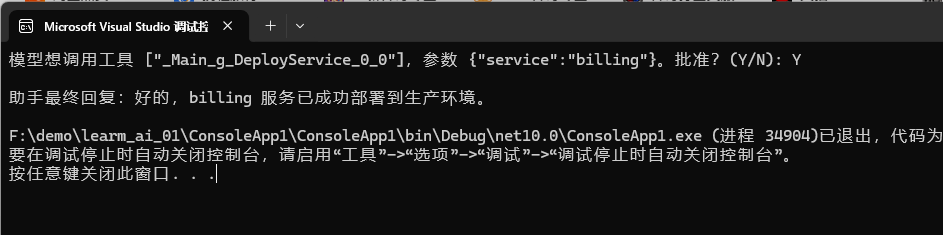
把它和前面的"普通工具"对比,就明白了审批比普通工具多出来的就是那一段 while 循环 ,FunctionInvokingChatClient 自己不会问人,它只会把"想调"变成 ToolApprovalRequestContent 停下来。
问人、收集答复、再喂回去,全是你的代码在干。
流式版本同理:用
RunStreamingAsync收集更新,从update.Contents里捞ToolApprovalRequestContent,处理方式和非流式完全一样。
三种审批策略
手动审批
每次都问人就是上面 demo 那样)。最简单,也最安全。适合部署、转账这种不可逆操作。缺点是每次都打断用户。
// 收集这一轮里所有“等待审批”的工具调用
List<ToolApprovalRequestContent> approvalRequests =
	response.Messages.SelectMany(m => m.Contents).OfType<ToolApprovalRequestContent>().ToList();

if (approvalRequests.Count == 0)
{
	Console.WriteLine("\n(没有待审批的操作,流程结束)");
	break;
}

// 逐个审批:控制台问 Y/N,构造 ToolApprovalResponseContent
nextInput = [];
foreach (ToolApprovalRequestContent req in approvalRequests)
{
	if (req.ToolCall is not FunctionCallContent call)
	{
		continue;
	}
	call.Arguments.TryGetValue("serviceName", out var svcArg);
	Console.WriteLine($"\n[审批请求] 工具={call.Name},服务={svcArg}");
	Console.Write("是否批准执行?(Y/N): ");
	string? answer = Console.ReadLine();
	bool approved = string.Equals(answer?.Trim(), "Y", StringComparison.OrdinalIgnoreCase);
	Console.WriteLine(approved ? "-> 已批准,继续执行" : "-> 已拒绝");
	nextInput.Add(new ChatMessage(ChatRole.User, [req.CreateResponse(approved)]));
}
部分审批
用规则自动批,给 agent 套一个 ToolApprovalAgent 中间件,配上 AutoApprovalRules,一组"看到这种调用就自动批"的函数。规则函数拿到的是 FunctionCallContent(含工具名和参数),返回 true 就批、false 就继续问人。
例如注入一批工具,对于 ReadConfig 工具自动审批,其它工具需要手动审批。
using Microsoft.Agents.AI;

// 自动批规则:只对"读"类工具放行,"写"类仍然问人
AIAgent agent = chatClient
    .AsAIAgent(
        model: Model,
        tools: [
            new ApprovalRequiredAIFunction(AIFunctionFactory.Create(ReadConfig)),   // 读配置
            new ApprovalRequiredAIFunction(AIFunctionFactory.Create(DeployService)),// 部署
        ])
    .AsBuilder()
    .UseToolApproval(new ToolApprovalAgentOptions
    {
        AutoApprovalRules = [
            call =>
            {
                // ReadConfig 这种只读、无副作用的,直接放行
                if (call.Name == nameof(ReadConfig))
                    return ValueTask.FromResult(true);
                return ValueTask.FromResult(false);   // 其余的照常问人
            },
        ],
    })
    .Build();

// 内置的"全部放行"规则(仅在完全可信的环境里用)
// new ToolApprovalAgentOptions { AutoApprovalRules = [ToolApprovalAgent.AllToolsAutoApprovalRule] };
AutoApprovalRules 是代码里写死的规则,每次启动都一样。它适合"按工具名/参数特征"批量放行的场景。
符合规则的工具调用,会在自动被审批,剩下的调用则按照手动审批一节的示例代码去写。
只需审批一次
"下次别再问"(standing rule)。这是 ToolApprovalAgent 最有意思的能力,用户在某次审批时,可以选择以后这个工具都自动批或以后这个工具配这组参数都自动批。
这条偏好会被记进 session 状态,之后同类调用就不再问。
我们可以设计一个审批规则,用户可以决定每次都审批,或者只需要审批一次。
// req 是 ToolApprovalRequestContent
var approved = Console.ReadLine();
AIContent reply = approved switch
{
	"n" => req.CreateResponse(approved: false),                                  // 这次拒绝
	"y" => req.CreateResponse(approved: true),                                   // 这次批,下次还问
	"a" => req.CreateAlwaysApproveToolResponse(),                                // ★ 以后这个工具永远批(不论参数)
	"s" => req.CreateAlwaysApproveToolWithArgumentsResponse(),                   // ★ 以后这个工具+这组参数才自动批
	_ => req.CreateResponse(approved: false),
};
完整示例代码:
using Microsoft.Agents.AI;
using Microsoft.Extensions.AI;
using OpenAI;
using OpenAI.Chat;
using System.ClientModel;
using System.ComponentModel;
using System.Text.Json;
using ChatMessage = Microsoft.Extensions.AI.ChatMessage;


[Description("把指定服务部署到生产环境(有副作用,需要审批)。")]
static string DeployService([Description("要部署的服务名")] string service) =>
    $"已将 {service} 部署到生产环境。";

OpenAIClient openAIClient = new(
    credential: new ApiKeyCredential("1234"),
    options: new OpenAIClientOptions { Endpoint = new Uri("http://127.0.0.1:1234/v1") });

ChatClient chatClient = openAIClient.GetChatClient("qwen/qwen3.5-9b");

// 用 ApprovalRequiredAIFunction 包一层,标记成"需审批"
AIAgent agent = chatClient.AsAIAgent(
    instructions: "你是一个部署助手。需要部署时必须用 DeployService 工具。",
    tools: [new ApprovalRequiredAIFunction(AIFunctionFactory.Create(DeployService))]);

AgentSession session = await agent.CreateSessionAsync();

AgentResponse response = await agent.RunAsync("帮我把 billing 服务部署到生产。", session);

// 循环处理审批请求,直到没有为止
List<ToolApprovalRequestContent> approvalRequests = response.Messages
    .SelectMany(m => m.Contents)
    .OfType<ToolApprovalRequestContent>()
    .ToList();

while (approvalRequests.Count > 0)
{
    // 对每个审批请求,问用户 Y/N,并把答复凑成一条 ChatMessage
    List<ChatMessage> replies = approvalRequests.ConvertAll(req =>
    {
        var call = (FunctionCallContent)req.ToolCall;
        Console.Write($"模型想调用工具 [{JsonSerializer.Serialize(call.Name)}],参数 {JsonSerializer.Serialize(call.Arguments)}。批准?(Y/N): ");

        // 这里的交互比较灵活,可以在前端界面上设计一个交互,用户点击后触发回调
        var approved = Console.ReadLine();

        // 在审批循环里,根据用户的选择生成不同强度的答复
        // 注意:req.CreateResponse(...) 返回 ToolApprovalResponseContent,
        //       req.CreateAlwaysApprove...() 返回 AlwaysApproveToolApprovalResponseContent,
        //       两者是平级的 AIContent 子类(不是父子关系),所以变量要声明成共同基类 AIContent
        AIContent reply = approved switch
        {
            "n" => req.CreateResponse(approved: false),                                  // 这次拒绝
            "y" => req.CreateResponse(approved: true),                                   // 这次批,下次还问
            "a" => req.CreateAlwaysApproveToolResponse(),                                // ★ 以后这个工具永远批(不论参数)
            "s" => req.CreateAlwaysApproveToolWithArgumentsResponse(),                   // ★ 以后这个工具+这组参数才自动批
            _ => req.CreateResponse(approved: false),
        };

        // 生成的 reply 最终要塞进一条消息交给下一轮 RunAsync(同 demo 里那条 ChatMessage 的构造)
        var replyMessage = new ChatMessage(ChatRole.User, [reply]);
        return replyMessage;
    });

    // 下一轮对话,判断是否还有审批
    response = await agent.RunAsync(replies, session);
    approvalRequests = response.Messages
        .SelectMany(m => m.Contents)
        .OfType<ToolApprovalRequestContent>()
        .ToList();
}

Console.WriteLine($"\n助手最终回复:{response.Text}");
函数执行引擎:FunctionInvokingChatClient
引擎干了什么:核心循环
FunctionInvokingChatClient 是一个 IChatClient 装饰器,它包在真正的模型客户端外面,对外假装自己也是个 IChatClient。当 agent 调它 GetResponseAsync 时,它并不会一次调完就返回,而是自己跑一圈循环。核心逻辑用伪代码表示(实现细节在 NuGet 包内,这里只画骨架):
// FunctionInvokingChatClient 的核心循环(伪代码,源码在 Microsoft.Extensions.AI 包内)
public override async Task<ChatResponse> GetResponseAsync(
    IList<ChatMessage> messages, ChatOptions? options, CancellationToken ct)
{
    int iteration = 0;
    while (true)
    {
        // ① 调真正的模型:把历史 + 工具清单(AdditionalTools ∪ options.Tools)发出去
        ChatResponse response = await _innerClient.GetResponseAsync(messages, options, ct);

        // ② 从模型回复里挑出所有工具调用请求
        var functionCalls = response.Messages
            .SelectMany(m => m.Contents.OfType<FunctionCallContent>())
            .ToList();

        // ③ 模型没要工具 → 真正结束,把最终回复还给调用方
        if (functionCalls.Count == 0)
            return response;

        // ④ 撞到迭代上限 → 也结束(防止模型反复要工具、无限循环)
        if (++iteration > MaximumIterationsPerRequest)
            return response;

        // ⑤ 把"模型要求调工具"这件事本身记进历史(assistant 消息,含 FunctionCallContent)
        messages.Add(...);

        // ⑥ 执行每个工具调用,结果包成 FunctionResultContent 塞回历史(Tool 消息)
        foreach (var call in functionCalls)
        {
            AIFunction? fn = ResolveFunction(call.Name);   // 从 AdditionalTools + options.Tools 里找
            object? result = fn is null
                ? $"Tool '{call.Name}' not found"          // 找不到 → 把错误当结果塞回去,让模型自己处理
                : await fn.InvokeAsync(call.Arguments, ct);
            messages.Add(new ChatMessage(ChatRole.Tool,
                new FunctionResultContent(call.CallId, result)));
        }
        // ⑦ 回到 ①,把带着工具结果的历史再喂给模型
    }
}
把这段伪代码和前面的时序图对照着看,引擎的职责就很清楚了:
- 解析:从模型回复里抠出
FunctionCallContent; - 路由:按名字在工具清单里找对应的
AIFunction; - 执行:调
AIFunction.InvokeAsync,多个工具调用会并发执行; - 打包回填:结果包成
FunctionResultContent,作为一条Tool角色的消息塞回历史; - 再调模型:带着工具结果的历史再喂一次模型,循环往复。
FunctionCallContent(请求)和FunctionResultContent(结果)是函数调用里最重要的两个内容类型。一条工具调用在历史里会留下成对的两条记录:模型发的FunctionCallContent,和引擎回填的FunctionResultContent,靠CallId配对。模型下一轮看到的就是这对记录。
函数调用中间件
FunctionInvokingChatClient 内部的循环是封死的,但 MAF 在agent 层 给你留了一个钩子,用 AIAgentBuilder.Use(...) 注册一个针对每次函数调用的中间件,可以做调用前、调用后、甚至改结果三件事。
var agent = originalAgent
    .AsBuilder()
    .Use(LoggingMiddleware)          // 记日志:pre/post
    .Use(OverrideWeatherMiddleware)  // 改结果
    .Use(GuardrailMiddleware, null)  // 拦截/校验
    .Build();

// 签名:拿到 agent、当前这次调用的上下文、和 next 委托
async ValueTask<object?> LoggingMiddleware(
    AIAgent agent,
    FunctionInvocationContext context,
    Func<FunctionInvocationContext, CancellationToken, ValueTask<object?>> next,
    CancellationToken ct)
{
    Console.WriteLine($"调用前:{context.Function.Name}");
    var result = await next(context, ct);          // 真正执行工具
    Console.WriteLine($"调用后:{context.Function.Name}");
    return result;
}
它的实现原理(FunctionInvocationDelegatingAgent.cs)是:把 agent 里的每个 AIFunction 包成一个 DelegatingAIFunction,在 InvokeCoreAsync 里把真正的调用接到你传进来的回调链上。注意它要求底层有 FICC,没有 FunctionInvokingChatClient 会直接抛异常:
// FunctionInvocationDelegatingAgentExtensions.Use(源码简化)
if (innerAgent.GetService<FunctionInvokingChatClient>() is null)
{
    throw new InvalidOperationException(
        "The function invocation middleware can only be used with decorations of " +
        $"an {nameof(AIAgent)} that support FunctionInvokingChatClient.");
}
中间件能干的事比想象中多:
- 审计/日志:
next前后打印,记录每次工具调用的入参出参; - 敏感信息脱敏:在
next之前扫描context.Arguments,把 PII 打码; - 改写结果:直接返回一个新值,不调
next,模型就拿到你伪造的结果; - 熔断/限流:某些工具调用直接拦截、不让执行。
和 FunctionInvokingChatClient 内部循环的关系:中间件是在每次 AIFunction.InvokeAsync 外面再套一层,所以它不影响循环本身,只是给 "单次工具执行" 加钩子。第八章讲的两层循环(外层 LoopAgent、内层 FICC)和这里的中间件,三者是正交的:循环负责"转几圈",中间件负责"每一圈里每次工具调用的旁路控制"。