
Agent 的循环本质
大家都知道,Agent 内部本质是循环。
模型本身只会读一段消息、吐一段回复,并不会反复思考、调用工具、再思考。
所谓 Agent 能自主完成任务,靠的是客户端内部的循环,把模型回复里带的工具调用捡起来执行、把结果塞回去、再让模型接着想,如此反复,直到模型不再要求调用工具为止。
在后续章节会介绍不同的 Agent 工作模式。
但只靠这一层循环还不够。很多任务不是调一次工具就完了,比如调研一个主题并写篇报告,可能要好几轮规划→搜索→写作→自检→补充才算交付。MAF 把这种需求抽象成第二层循环,由一个专门的评判器在每一轮结束后判断任务是否完成,没完成就把整个 Agent 再跑一遍。
所以 MAF SDK 里的 loop 是两层嵌套的,职责分明:
| 内层循环(工具调用级) | 外层循环(任务级) | |
|---|---|---|
| 实现 | FunctionInvokingChatClient(来自 Microsoft.Extensions.AI) | LoopAgent(Microsoft.Agents.AI,Harness 命名空间) |
| 循环体 | 一次"调模型 → 解析工具调用 → 执行工具 → 塞回结果" | 一次完整的 agent run(含内层循环) |
| 停止条件 | 模型不再请求工具调用(或撞到迭代上限) | 评判器判定任务完成(或撞到 MaxIterations) |
| 谁说了算 | 模型(它要调工具就继续) | 评判器(基于这一轮的产出) |
| 挂载方式 | 管道中间件(UseFunctionInvocation) | 装饰器包住整个 agent |
两层是正交的:外层每跑一次,内层都会自己转好几圈。下图是它们的嵌套关系:
HarnessAgent 和 LoopAgent 的关系
MAF 框架也提供了 HarnessAgent 。
MAF 里有两种 agent:
- 普通
AIAgent:要工具循环、要压缩、要历史、要记忆,都得你自己用AIAgentBuilder/ChatClientBuilder一层一层手搭。 HarnessAgent:MAF 提供的开箱即用的封装。但它自动把前面几章讲的能力拼成一条完整管道,每件能力都用一个Disable*开关单独控制。创建方式是:
AIAgent agent = chatClient.AsHarnessAgent(new HarnessAgentOptions { ... });
它默认装配的栈,几乎覆盖了前面所有章节具有的能力:
| 能力 | 默认 | 关闭开关 |
|---|---|---|
工具调用循环 FunctionInvokingChatClient(本章内层循环) | 开 | 受 MaximumIterationsPerRequest 限制 |
上下文压缩 CompactionProvider(第六章) | 开 | DisableCompaction |
历史持久化,默认 InMemoryChatHistoryProvider(第五章) | 开 | 传自定义 ChatHistoryProvider |
Todo 列表 TodoProvider | 开 | DisableTodoProvider |
文件记忆 FileMemoryProvider(第七章的"记忆") | 开 | DisableFileMemory |
工具自动审批 ToolApprovalAgent | 开 | DisableToolAutoApproval |
链路追踪 OpenTelemetryAgent | 开 | DisableOpenTelemetry |
任务级循环 LoopAgent(本章外层循环) | 关 | 传 LoopEvaluators 开启 |
现在关系就清楚了。LoopAgent 是 HarnessAgent 的可选外挂之一,由 HarnessAgentOptions.LoopEvaluators 这个开关控制。源码里 HarnessAgent.BuildAgent 的逻辑很简单:只要你传了至少一个 evaluator,它就在装配链最外层自动套一个 LoopAgent:
// HarnessAgent.BuildAgent 内部(源码简化)
if (options?.LoopEvaluators is IEnumerable<LoopEvaluator> loopEvaluators)
{
    var list = loopEvaluators.ToList();
    if (list.Count > 0)
        builder.Use((inner, _) => new LoopAgent(inner, list, options.LoopAgentOptions, loggerFactory));
}
于是就有两种等价的写法,它们做的是同一件事:
// 写法 A:让 HarnessAgent 帮你套(推荐,更简洁)
AIAgent agent = chatClient.AsHarnessAgent(new HarnessAgentOptions
{
    LoopEvaluators = [new TodoCompletionLoopEvaluator()],   // ← 传进来,HarnessAgent 自动套 LoopAgent
    LoopAgentOptions = new() { MaxIterations = 5 },
});

// 写法 B:自己手动套(本章 sample 的演示写法,方便对照每一层)
AIAgent harnessAgent = chatClient.AsHarnessAgent(new HarnessAgentOptions { /* 不传 LoopEvaluators */ });
AIAgent loopAgent   = new LoopAgent(harnessAgent, evaluator, new LoopAgentOptions { MaxIterations = 5 });
所以本章的两层循环可以这样理解:
- 内层循环(工具调用循环)=
HarnessAgent默认就开着的FunctionInvokingChatClient,你什么都不用管; - 外层循环(
LoopAgent)=HarnessAgent默认关着、需要你用LoopEvaluators开启的模块(或自己手动套一层)。
下面分别拆开看这两层。
内层循环
这是 Agent 最底层、也最关键的循环。
它来自 Microsoft.Extensions.AI 的 FunctionInvokingChatClient,一个 IChatClient 装饰器。
MAF 的 HarnessAgent 在构建管道时,通过 UseFunctionInvocation 把它挂上去:
// HarnessAgent.BuildInnerAgent 里的关键一段(简化)
ChatClientBuilder pipeline = chatClientBuilder
    .UseFunctionInvocation(
        loggerFactory,
        configure: options?.MaximumIterationsPerRequest is int maxIterations
            ? ficc => ficc.MaximumIterationsPerRequest = maxIterations   // 内层循环的硬上限
            : null)
    .UseMessageInjection()
    .UsePerServiceCallChatHistoryPersistence();
FunctionInvokingChatClient 把调模型这件事包成了一个大循环,伪代码大致是:
do {
    response = chatClient.GetResponseAsync(messages, tools)   // ① 调模型
    toolCalls = 从 response 里挑出 FunctionCallContent          // ② 看模型要不要调工具
    foreach (call in toolCalls)
        result = 执行对应的 AIFunction                          // ③ 真正执行工具
        messages.Add(toolCallMessage)                          // ④ 把调用记录塞回消息
        messages.Add(toolResultMessage)                        // ④ 把工具结果塞回消息
} while (toolCalls 非空 && 迭代次数 < 上限)                      // ⑤ 模型还想要工具就继续
每转一圈,消息列表就变长一点(追加工具调用 + 工具结果),下一轮模型就能看到上一轮工具的结果继续推理。当模型觉得信息够了,可以直接回答时,它不再发 FunctionCallContent,循环自然结束。agent 能自主多步靠的就是这个,不是模型有多智能,而是循环把模型的每一步串了起来。
几个需要留意的点:
MaximumIterationsPerRequest是内层循环的硬上限,防止模型无限制地调工具烧 token。它对应HarnessAgentOptions.MaximumIterationsPerRequest,默认是null,此时沿用FunctionInvokingChatClient自身的默认值。撞到上限会强制结束并返回当前结果。- 工具调用必须成对:内层循环保证"调用消息 + 结果消息"成对追加,少了任何一条,下一次调模型时 API 会直接报错(OpenAI 等服务会校验
callId配对)。这也是上一章压缩要把它们当作不可拆分的原子组处理的原因。 - 内层循环是同步的、原子的:它必须在一个
RunAsync调用里跑完,中间不能让人插手。如果某个工具需要人工审批(ApprovalRequiredAIFunction),内层循环会"卡住",把审批请求返回给调用方,这时外层循环看到 pending approval 也会停下来(见后文)。 - 流式下的额外复杂度:流式输出时工具调用是边收边解析的,
ChatClientAgent.RunCoreStreamingAsync用while (hasUpdates)配合MoveNextAsync逐个 yield update,还要处理消费者提前退出时清理 enumerator。
内层循环回答了调不调工具的问题,却回答不了任务做完没。比如提问 "规划三件事并全部完成",内层循环可能跑完一次模型就停了(它觉得这轮没工具要调),但任务其实只做了一半。这就需要外层循环出场,把整个 Agent 反复跑,直到某个评判器说认为已完成任务。
外层循环
MAF 的外层循环由 LoopAgent 实现。它是个 DelegatingAIAgent 装饰器模式,包住任意一个内部 Agent,对外暴露和普通 Agent 一样的 RunAsync/RunStreamingAsync,但内部把单次 run变成了多次 run 的循环。
LoopAgent.RunCoreAsync 的核心骨架(简化)如下,它的控制流也可以对照下图:
while (true)
{
    // ① 跑一次内部 agent(这一次内部自己就会转好几圈工具调用)
    AgentResponse response = await this.InnerAgent.RunAsync(currentMessages, activeSession, ...);
    iteration++;

    // ② 更新循环上下文(iteration、LastResponse、Feedback 日志)
    context.Iteration = iteration;
    context.LastResponse = response;

    // ③ 工具审批挂起 → 立刻停,把审批请求返回给调用方
    if (HasPendingApprovalRequests(response))
        return this.BuildResult(response, transcript);

    // ④ 撞全局安全上限 → 强制停
    if (iteration >= this._maxIterations)
        return this.BuildResult(response, transcript);

    // ⑤ 问评判器:要不要再来一轮?
    LoopNextStep step = await this.EvaluateAndBuildNextAsync(context, ...);
    if (!step.ShouldContinue)
        return this.BuildResult(response, transcript);

    // ⑥ 评判器要继续 → 把它的 feedback 当作下一轮的输入
    currentMessages = step.Messages;
}
从骨架里能看出几个关键设计:
① 调用方的原始输入只发一次。 第一轮用调用方传进来的 messages,之后每一轮用的是评判器给的 feedback(或重新构造的消息),而不是把原始问题重发一遍,避免了"每轮都问一遍同样的问题"。
② session 默认复用。 FreshContextPerIteration = false(默认)时,整个循环共用一个 session,模型能从 session 历史里接上之前的对话,适合"渐进式完善"(每轮在前一轮基础上改)。
③ session 也可每轮重置。 FreshContextPerIteration = true 时,每轮迭代开始前把 session 重置成初始快照:循环自建的 session 直接 new 一个;调用方传入的 session 会先在循环开始时序列化存档,每轮反序列化一个新 clone。
④ 三道安全阀。 全局 MaxIterations(默认 10)是不可突破的硬上限;工具审批挂起会立刻停(循环不能自动处理审批);其余情况交给评判器决定。
骨架里的第 ⑤ 步才是外层循环真正的"大脑",评判器。LoopAgent 自己并不知道"任务做完没",这个判断完全交给 LoopEvaluator。
评判器:循环的大脑
LoopEvaluator 是个抽象类,契约只有一个方法:看一眼当前的 LoopContext,返回要不要再来一轮 + 带什么 feedback。
public abstract class LoopEvaluator
{
    public abstract ValueTask<LoopEvaluation> EvaluateAsync(LoopContext context, CancellationToken ct = default);
}
返回值 LoopEvaluation 有三种构造方式:
LoopEvaluation.Stop()                                  // 停,任务完成
LoopEvaluation.Continue("还差 XX 没做,继续")            // 再来一轮,带 feedback 文本
LoopEvaluation.ContinueWithMessages([msg1, msg2])      // 再来一轮,下一轮的输入我自己定(绕过 feedback 构造)
评判器是无状态的(要求"可被并发循环共享"),每次循环的临时状态都挂在 LoopContext 上。LoopContext 提供了评判所需的一切:
| 属性 | 含义 |
|---|---|
Agent | 被循环的内部 agent(可用来 GetService<T> 反查内部 provider) |
Session | 当前循环用的 session(FreshContextPerIteration 时会被替换) |
InitialMessages | 调用方最初传入的消息(第一轮的输入) |
Iteration | 已完成的迭代次数(从 1 开始) |
LastResponse | 最近这一轮 agent 的响应(评判器最常看的就是它的 .Text) |
Feedback | 跨迭代累积的 feedback 日志(只读列表,每轮一条) |
RunOptions | 本次 run 的选项 |
AdditionalProperties | 评判器之间共享状态的字典 |
挂多个评判器时的协作规则很值得记住:LoopAgent 可以挂多个 evaluator,按顺序求值,第一个要求继续的赢,它的 feedback 驱动下一轮,剩下的不再评估。循环停止的条件是所有评判器都说停。
内置的五种评判器
SDK 在 src/Microsoft.Agents.AI/Harness/Loop/ 下提供了五种开箱即用的 evaluator,覆盖最常见的停循环策略。它们对应的,其实是五种不同的任务完成信号。
这些模式你读起来可能难以理解,你可以先简单读一次,然后在后续的实战环节里面,我们会手动实现一个 Agent,这样你就明白两层循环和五种评判器的用法和原理了。
后面的案例都会介绍到 LoopAgent,涉及到 LoopAgentOptions` 控制循环的整体行为,这里先提前介绍。
| 属性 | 默认 | 作用 |
|---|---|---|
MaxIterations | 10(DefaultMaxIterations) | 全局硬上限,evaluator 突破不了 |
FreshContextPerIteration | false | 每轮是否重置 session |
OnBehalfOfAuthorName | null | 循环代发的 feedback 消息打上什么作者名 |
ExcludeOnBehalfOfMessages | false | 是否把循环代发的消息从返回结果里剔除 |
NonStreamingReturnsLastResponseOnly | false | 非流式返回是聚合全部迭代,还是只返回最后一轮 |
SessionCreatedCallback | null | 循环每次新建 session 时的回调 |
这里需要解释一下"循环代发的消息":当评判器说"继续 + feedback",循环会替调用方合成一条 user 消息发给内部 agent。这条消息不是真实用户发的,是循环自己造的。默认情况下它会出现在返回结果里(流式里作为一个 user turn 暴露),让调用方看到"循环在替我驱动"。两个相关选项就是控制它的:
OnBehalfOfAuthorName = "loop":给这些代发消息标个作者名,下游好区分"用户说的"和"循环替用户说的"。ExcludeOnBehalfOfMessages = true:返回结果里只看 agent 的回复,不暴露循环的代发消息(但消息照发)。
CompletionMarkerLoopEvaluator 约定一个完成标记
最简单直接:约定一个完成标记字符串(比如 <promise>COMPLETE</promise>),agent 产出里出现这个标记就停,否则继续并反馈做完了记得带这个标记。它不需要任何额外的 LLM 调用,零成本、可靠性高(本质就是一个字符串包含判断)。适合任务有明确终点信号的场景。
new CompletionMarkerLoopEvaluator("<promise>COMPLETE</promise>")
它的 feedback 模板支持两个占位符:{completion_marker}(替换成标记)和 {last_response}(替换成上一轮回复)。后者在 FreshContextPerIteration = true 时特别有用,因为每轮 session 重置后 agent 看不到自己上轮说了什么,用 {last_response} 把上一轮产出回显给它。
例如你需要反复打磨同一个产出,直到 Agent 自己发出完成标记。配 FreshContextPerIteration,每轮独立重做、累积 feedback。然后使用 LoopAgent 判断当前轮输入里面有没有附带这个标签,然后没有,继续下一轮对话。
其原理是在提示词中让 AI 模型在输出的末尾附加 <promise>COMPLETE</promise> 标识,适合文案、命名、方案设计这类没有客观终点、靠反复打磨的任务。
using System.ClientModel;
using Microsoft.Agents.AI;
using Microsoft.Extensions.AI;
using OpenAI;

IChatClient chatClient = new OpenAIClient(
        credential: new ApiKeyCredential("1234"),
        options: new OpenAIClientOptions { Endpoint = new Uri("http://127.0.0.1:1234/v1") })
    .GetChatClient("qwen/qwen3.5-9b")
    .AsIChatClient();

AIAgent harnessAgent = chatClient.AsAIAgent(
    name: "ralph",
    instructions: """
        你在为一个笔记应用迭代打磨产品名。每一轮都基于反馈给出一个更好的候选名 + 简短理由。
        当你确信名字已经定稿,在回复结尾加上标记 <promise>COMPLETE</promise>。
        """);

// CompletionMarkerLoopEvaluator:标记出现就停,否则继续。
AIAgent loopAgent = new LoopAgent(
    harnessAgent,
    new CompletionMarkerLoopEvaluator("<promise>COMPLETE</promise>", options: new()
    {
        FeedbackMessageTemplate =
            "你上一版的建议是:\n" + CompletionMarkerLoopEvaluator.LastResponsePlaceholder +
            "\n\n继续打磨,满意了就回复 " + CompletionMarkerLoopEvaluator.CompletionMarkerPlaceholder + "。",
    }),
    new LoopAgentOptions { MaxIterations = 5, FreshContextPerIteration = true });

// ResponseId 变化 = 外层循环又重新跑了一次内层 agent,用来分隔每一轮。
string? currentResponseId = null;
ChatRole? currentRole = null;
var runCount = 0;
var allUpdates = new List<AgentResponseUpdate>();

bool reasoningStarted = false;
bool textStarted = false;

await foreach (AgentResponseUpdate update in loopAgent.RunStreamingAsync("给这个笔记应用起个名字。"))
{
    // ResponseId 变化 = 外层循环又重新跑了一次内层 agent
    if (update.ResponseId is { } id && id != currentResponseId)
    {
        currentResponseId = id;
        currentRole = null;
        reasoningStarted = false;
        textStarted = false;
        Console.WriteLine($"\n--- 第 {++runCount} 轮 ---");
    }

    // 角色变化时打印前缀
    if (update.Role is { } role && role != currentRole)
    {
        currentRole = role;
        var prefix = role == ChatRole.User ? "User" : role == ChatRole.Assistant ? "Agent" : role.Value;
        Console.Write($"\n{prefix}: ");
    }

    // 思考过程:逐块实时打印
    foreach (var reasoning in update.Contents.OfType<TextReasoningContent>())
    {
        if (!reasoningStarted)
        {
            Console.Write("\n[思考] ");
            reasoningStarted = true;
        }

        Console.Write(reasoning.Text);
    }

    // 正文:逐块实时打印。正文一来,就在思考块和正文块之间插个分隔。
    if (!string.IsNullOrEmpty(update.Text))
    {
        if (!textStarted && reasoningStarted)
        {
            Console.Write("\n[正文] ");
        }

        textStarted = true;
        Console.Write(update.Text);
    }

    allUpdates.Add(update);
}

Console.WriteLine();
Console.WriteLine($"\n最终回复:\n{allUpdates.ToAgentResponse().Text}");
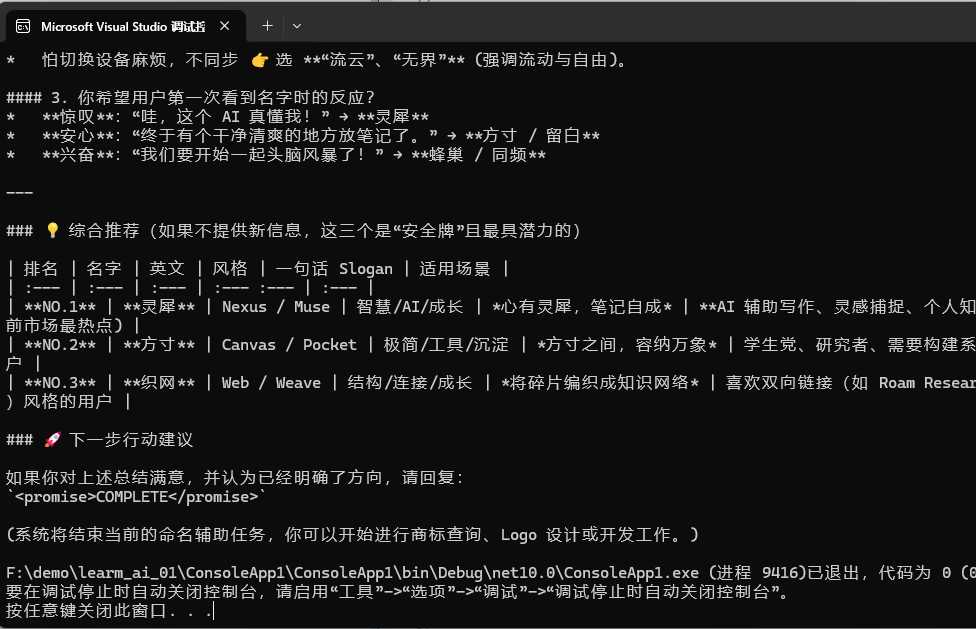
DelegateLoopEvaluator 交给一个回调
最灵活,传一个 Func<LoopContext, CancellationToken, ValueTask<LoopEvaluation>>,判断逻辑全交给你。适合停循环条件很业务化的场景。
也就是说,判断停止的条件完全交给开发者。比如 "响应里包含 deployed 字样就停"、"调用了某个特定工具就停"
new DelegateLoopEvaluator((context, ct) =>
{
    bool done = context.LastResponse.Text.Contains("deployed", StringComparison.OrdinalIgnoreCase);
    return new ValueTask<LoopEvaluation>(done ? LoopEvaluation.Stop() : LoopEvaluation.Continue());
})
它本身不绑定任何状态,是一个万能出口,下面的 TodoCompletionLoopEvaluator 其实就可以用 DelegateLoopEvaluator 手写出来。
让 Agent 自己把任务拆成 todo,循环到全部打勾为止。不要开 FreshContextPerIteration,因为 todo 状态要留在 session 里。
适合 规划→分步执行→汇总 的多步任务。
using System.ClientModel;
using Microsoft.Agents.AI;
using Microsoft.Extensions.AI;
using OpenAI;

#pragma warning disable MAAI001
#pragma warning disable OPENAI001


IChatClient chatClient = new OpenAIClient(
        credential: new ApiKeyCredential("1234"),
        options: new OpenAIClientOptions { Endpoint = new Uri("http://127.0.0.1:1234/v1") })
    .GetChatClient("qwen/qwen3.5-9b")
    .AsIChatClient();

AIAgent harnessAgent = chatClient.AsAIAgent(
    new ChatClientAgentOptions
    {
        Name = "ralph",
        ChatOptions = new ChatOptions
        {
            Instructions = """
                你是一个规划助手。先用 todo 工具把任务拆成若干待办项;
                每一轮推进一项,完成的及时标记为 done;全部完成后给出总结。
                """,
        },
        AIContextProviders = [new TodoProvider()],  // 注入
    });

// 判断逻辑全交给一个委托:通过 GetService 拿到 TodoProvider,
AIAgent loopAgent = new LoopAgent(
    harnessAgent,
    new DelegateLoopEvaluator(async (context, ct) =>
    {
        var todoProvider = context.Agent.GetService<TodoProvider>()
            ?? throw new InvalidOperationException("agent 上没有挂 TodoProvider。");
        var remaining = await todoProvider.GetRemainingTodosAsync(context.Session, ct);
        return remaining.Count > 0
            ? LoopEvaluation.Continue($"还有 {remaining.Count} 项未完成,继续。")
            : LoopEvaluation.Stop();
    }),
    new LoopAgentOptions { MaxIterations = 6 });

// ResponseId 变化 = 外层循环又重新跑了一次内层 agent,用来分隔每一轮。
string? currentResponseId = null;
ChatRole? currentRole = null;
var runCount = 0;
var allUpdates = new List<AgentResponseUpdate>();

bool reasoningStarted = false;
bool textStarted = false;

await foreach (AgentResponseUpdate update in loopAgent.RunStreamingAsync("规划并写出一篇关于'等比数列'的 3 段式博客大纲。"))
{
    // ResponseId 变化 = 外层循环又重新跑了一次内层 agent
    if (update.ResponseId is { } id && id != currentResponseId)
    {
        currentResponseId = id;
        currentRole = null;
        reasoningStarted = false;
        textStarted = false;
        Console.WriteLine($"\n--- 第 {++runCount} 轮 ---");
    }

    if (update.Role is { } role && role != currentRole)
    {
        currentRole = role;
        var prefix = role == ChatRole.User ? "User" : role == ChatRole.Assistant ? "Agent" : role.Value;
        Console.Write($"\n{prefix}: ");
    }

    // 思考过程:逐块实时打印
    foreach (var reasoning in update.Contents.OfType<TextReasoningContent>())
    {
        if (!reasoningStarted)
        {
            Console.Write("\n[思考] ");
            reasoningStarted = true;
        }

        Console.Write(reasoning.Text);
    }

    // 正文:逐块实时打印。正文一来,就在思考块和正文块之间插个分隔。
    if (!string.IsNullOrEmpty(update.Text))
    {
        if (!textStarted && reasoningStarted)
        {
            Console.Write("\n[正文] ");
        }

        textStarted = true;
        Console.Write(update.Text);
    }

    allUpdates.Add(update);
}

Console.WriteLine();
Console.WriteLine($"\n最终回复:\n{allUpdates.ToAgentResponse().Text}");
TodoProvider 会在上下文注入一下这些 tool ,todos_add、todos_complete、todos_remove、todos_get_remaining、todos_get_all 等。
模型调用 tool 增加或完成任务,就会调用 TodoProvider 里面的函数标记为完成,开发者可以使用GetRemainingTodosAsync()(todos_get_remaining) 获取待办任务列表,从而判断是否应该结束当前循环。
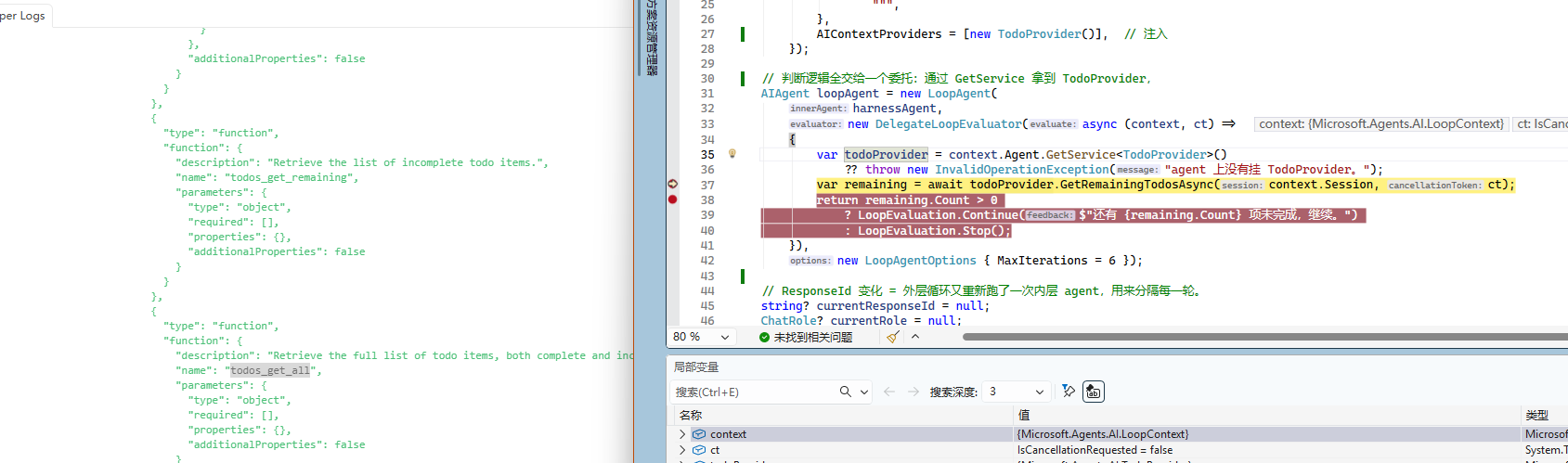
TodoCompletionLoopEvaluator 列表清空为止
专为规划-执行"模式设计:循环 设计,TodoProvider 里没有未完成项为止。它不要求你直接把 TodoProvider 传进来,而是在运行时通过 context.Agent.GetService<TodoProvider>() 反查,只要 agent 上挂了 TodoProvider(HarnessAgent 默认就挂了),evaluator 不用任何额外接线就能用。还可以配 Modes 限定只在某些 agent 模式下生效。
new TodoCompletionLoopEvaluator() // 自动发现 agent 上的 TodoProvider
未完成时,feedback 模板会把"剩余 todo 列表"塞给 agent,让它接着做。这是"让 agent 自己拆任务、自己做完"最顺手的姿势。
上一个小节,一个通过讲解 DelegateLoopEvaluator 已经实现了一个类似 TodoCompletionLoopEvaluator 的功能,所以这里就不重复讲解 TodoCompletionLoopEvaluator 了。只需要在 DelegateLoopEvaluator 一节的代码,替换 LoopAgent 实例化即可。
AIAgent loopAgent = new LoopAgent(
    harnessAgent,
    new TodoCompletionLoopEvaluator(),
    new LoopAgentOptions { MaxIterations = 6 });
AIJudgeLoopEvaluator 让 LLM 当裁判
还有一个骚操作,就是让 AI 做裁判,也就是说 单独开一个 IChatClient 当裁判,每轮结束后问它 "原始请求被完整回答了吗" ,我们可以利用一些便宜的模型来完成这个判决过程,不过可能会比较慢,整体设计也比较沉重。
裁判返回结构化的 JudgeVerdict(answered + gapAnalysis);客户端不支持结构化输出时,回落到解析文本标记 VERDICT: DONE / VERDICT: MORE(设计上 MORE 优先,模糊时宁可多跑一轮)。
new AIJudgeLoopEvaluator(judgeChatClient) // 建议用便宜的小模型当裁判
未完成时,feedback 模板会把裁判的 gap 分析塞进去,告诉 agent "你还差 XX"。它成本最高(每轮多一次 LLM 调用)、也最不确定(裁判可能误判),适合"完成标准难以用规则表达"的复杂任务,建议同时配一个较紧的 MaxIterations。
只需要在 DelegateLoopEvaluator 一节的代码,替换 LoopAgent 实例化即可。
AIAgent loopAgent = new LoopAgent(
    harnessAgent,
    new AIJudgeLoopEvaluator(chatClient),
    new LoopAgentOptions { MaxIterations = 6 });
BackgroundTaskCompletionLoopEvaluator 等后台任务跑完
当 agent 会派生子任务在后台跑(通过 BackgroundAgentsProvider)时,用这个 evaluator 让循环一直转到所有后台任务结束。它同样通过 context.Agent.GetService<BackgroundAgentsProvider>() 自动发现 provider,只把"仍在运行中"的任务当作未完成,已完成、失败、丢失的任务都是终态,不会让循环空转。
new BackgroundTaskCompletionLoopEvaluator() // 自动发现 agent 上的 BackgroundAgentsProvider
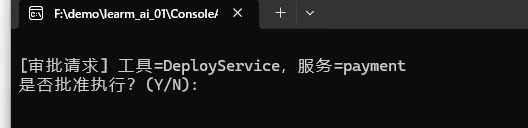
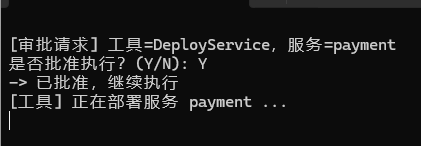
using System.ClientModel;
using System.ComponentModel;
using Microsoft.Agents.AI;
using Microsoft.Extensions.AI;
using OpenAI;

#pragma warning disable MAAI001
#pragma warning disable OPENAI001

// 一个“部署”操作:只有人工批准后才会真正执行。
[Description("部署指定的服务。需要人工审批后才会执行。")]
static string DeployService([Description("要部署的服务名称")] string serviceName)
{
    Console.WriteLine($"[工具] 正在部署服务 {serviceName} ...");
    return $"服务 {serviceName} 已成功部署。";
}

IChatClient chatClient = new OpenAIClient(
        credential: new ApiKeyCredential("1234"),
        options: new OpenAIClientOptions { Endpoint = new Uri("http://127.0.0.1:1234/v1") })
    .GetChatClient("qwen/qwen3.5-9b")
    .AsIChatClient();

// 用 ApprovalRequiredAIFunction 包裹部署工具:模型调用它时不会立即执行,
// 而是先返回一个 ToolApprovalRequestContent,等人工批准后才会真正跑 DeployService。
AIFunction deployTool = new ApprovalRequiredAIFunction(
    AIFunctionFactory.Create(DeployService, name: "DeployService"));

AIAgent agent = chatClient.AsAIAgent(
    new ChatClientAgentOptions
    {
        Name = "deploy-bot",
        ChatOptions = new ChatOptions
        {
            Instructions = """
                你是部署操作员。当用户要求部署服务时,用 DeployService 工具完成部署。
                部署完成后用一句话告诉用户结果。
                """,
            Tools = [deployTool],
        },
    });

// 审批必须复用同一个 session(待审批状态挂在 session 上),所以显式创建一个。
AgentSession session = await agent.CreateSessionAsync();

// 交互循环:
//   1) 跑一轮 agent
//   2) 打印模型回复
//   3) 如果有待审批的工具调用 → 停下来问用户 Y/N → 把结果喂回去 → 回到 1)
//   4) 没有待审批请求 → 结束
// 第一次的输入是用户需求;后续轮次的输入是审批响应列表。
string? prompt = "请帮我部署一个叫 payment 的服务。";
List<ChatMessage>? nextInput = null;

while (true)
{
    AgentResponse response = nextInput is null
        ? await agent.RunAsync(prompt!, session)
        : await agent.RunAsync(nextInput, session);

    nextInput = null;

    // 打印模型的文本回复
    string reply = string.Concat(response.Messages
        .SelectMany(m => m.Contents)
        .OfType<TextContent>()
        .Select(t => t.Text));
    if (!string.IsNullOrWhiteSpace(reply))
    {
        Console.WriteLine($"Agent: {reply}");
    }

    // 收集这一轮里所有“等待审批”的工具调用
    List<ToolApprovalRequestContent> approvalRequests =
        response.Messages.SelectMany(m => m.Contents).OfType<ToolApprovalRequestContent>().ToList();

    if (approvalRequests.Count == 0)
    {
        Console.WriteLine("\n(没有待审批的操作,流程结束)");
        break;
    }

    // 逐个审批:控制台问 Y/N,构造 ToolApprovalResponseContent
    nextInput = [];
    foreach (ToolApprovalRequestContent req in approvalRequests)
    {
        if (req.ToolCall is not FunctionCallContent call)
        {
            continue;
        }
        call.Arguments.TryGetValue("serviceName", out var svcArg);
        Console.WriteLine($"\n[审批请求] 工具={call.Name},服务={svcArg}");
        Console.Write("是否批准执行?(Y/N): ");
        string? answer = Console.ReadLine();
        bool approved = string.Equals(answer?.Trim(), "Y", StringComparison.OrdinalIgnoreCase);
        Console.WriteLine(approved ? "-> 已批准,继续执行" : "-> 已拒绝");
        nextInput.Add(new ChatMessage(ChatRole.User, [req.CreateResponse(approved)]));
    }
    // 回到循环顶部:带着审批结果再跑一轮(批准→执行工具,拒绝→告知模型被拒)
}
feedback 如何变成下一轮的输入
这部分逻辑在 LoopAgent.BuildNextMessages 方法里,分两种模式。
复用 session 模式(FreshContextPerIteration = false,默认)
session 里已经有完整历史,每轮只需要发最新一条 feedback:
string? latest = feedback[feedback.Count - 1];   // 只取最后一条
if (!string.IsNullOrWhiteSpace(latest))
    messages.Add(new ChatMessage(ChatRole.User, latest));   // 发给 agent
Agent 从 session 历史里能看到前面所有轮次,这条 feedback 就是 "再往前推一步" 的指令。
fresh context 模式(FreshContextPerIteration = true)
每轮 session 重置后历史没了,必须把原始任务 + 累积的全部 feedback 重新发一遍:
messages.AddRange(context.InitialMessages);                 // 原始任务
ChatMessage? feedbackMessage = BuildAggregatedFeedbackMessage(feedback);
if (feedbackMessage is not null)
    messages.Add(feedbackMessage);                          // 所有 feedback 拼成一条
BuildAggregatedFeedbackMessage 把历史 feedback 拼成 ## Feedback\n- 条1\n- 条2... 的格式。这样 agent 每轮都能看到 "原始任务 + 截至目前所有的改进意见",独立但连贯地重新作答。
第三种:evaluator 自己指定消息
如果评判器用的是 ContinueWithMessages,它就完全接管了下一轮的输入,绕过上面的 feedback 构造逻辑。适合需要发非 user 角色、多条消息、或非文本内容的场景。注意 session 该不该重置还是照常(如果开了 fresh 就重置),只是消息内容由 evaluator 决定。